
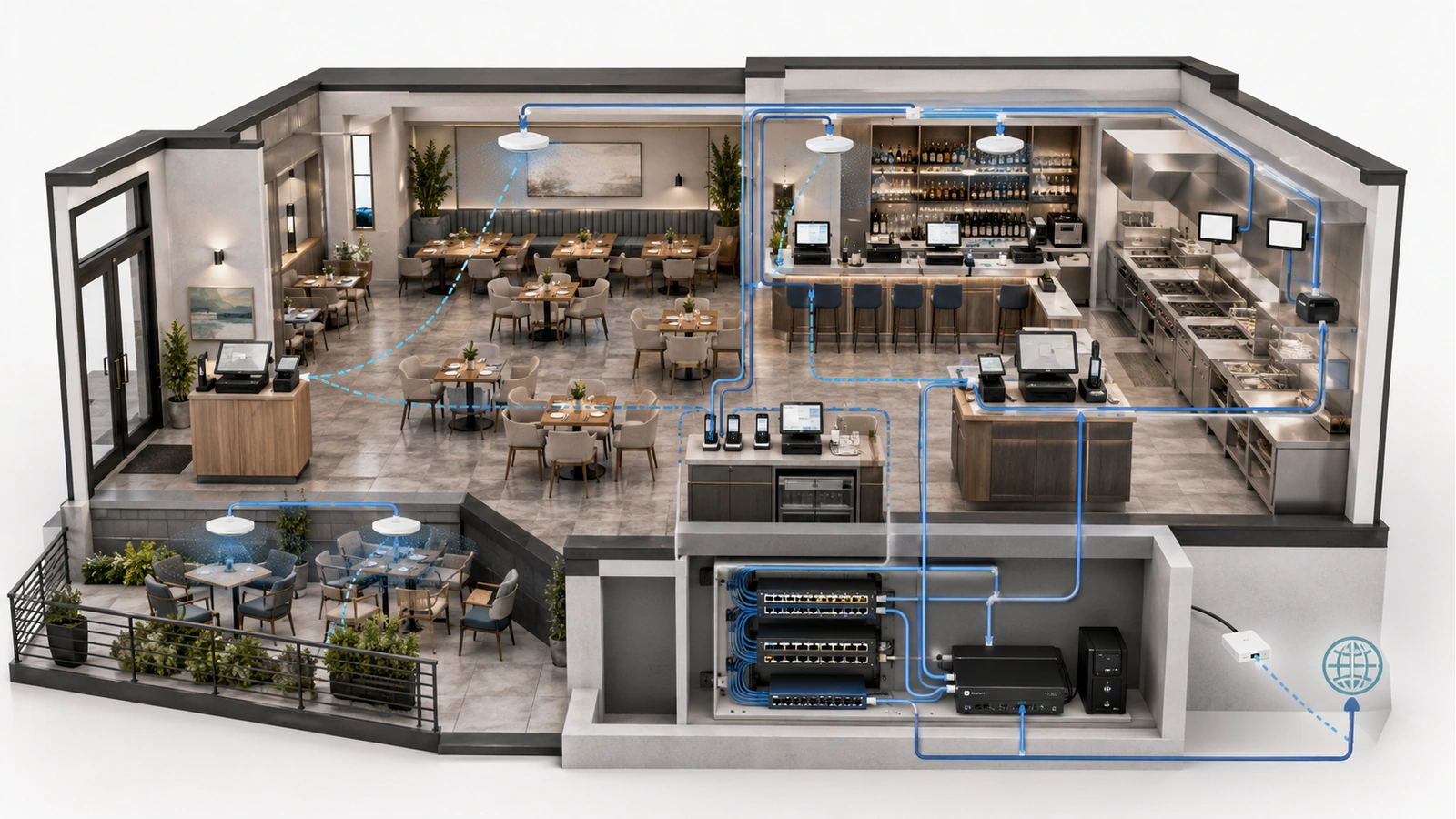
Restaurant POS reliability depends far more on consistent communication than impressive speed-test results. Individual orders and payment messages may use relatively little bandwidth, yet a brief wireless interruption, unstable switch port, failed name-resolution service, or internet outage can disrupt an entire service workflow.
A modern POS environment also extends far beyond the terminals at the counter. It may connect server handhelds, payment devices, kitchen printers, display systems, online ordering, reservations, inventory platforms, loyalty programs, and remote management services.
The network must support that complete chain during the busiest operational periods. That requires stable wired and wireless connections, controlled security boundaries, resilient power, understood internet dependencies, and documented recovery procedures.
This article builds on the broader architecture described in Restaurant & Hospitality Technology Infrastructure: A Practical Foundation.
Key Takeaway
A POS network should be designed around the complete order-and-payment workflow. Every terminal, handheld, printer, kitchen display, switch, access point, gateway, cloud platform, and power source can influence operational reliability.
01 Map the Complete POS Service Path
Before selecting network equipment, document how an order moves from staff interaction to payment and kitchen production.
A typical workflow may involve:
- A fixed terminal or wireless handheld
- A local POS application or cloud platform
- A payment terminal and external processor
- A kitchen display or production printer
- Online ordering and delivery integrations
- Reservation, loyalty, inventory, or reporting platforms
- Local switches, access points, gateways, and internet services
Not every component follows the same communication path. A kitchen ticket may travel locally while a payment requires an external authorization service. An online order may arrive through a cloud integration even when local terminals remain operational.
The property and its vendors should identify:
- Which functions require the internet
- Which functions continue locally
- Which devices communicate directly
- Which services depend on DNS, time, authentication, or cloud platforms
- Where each vendor’s responsibility begins and ends
- What staff should do when one dependency becomes unavailable
This mapping prevents every symptom from being classified simply as “the POS is down.”
02 Prioritize Stability Over Headline Bandwidth
Most POS communication does not require enormous throughput. It does require dependable packet delivery, predictable response, and rapid recovery from ordinary failures.
Operational symptoms can result from:
- Packet loss or unstable wireless links
- Intermittent cabling or switch ports
- Addressing conflicts
- DNS or gateway failures
- Access-point roaming transitions
- Internet-provider congestion or outages
- External POS or payment-platform incidents
- Power interruptions and device reboots
Adding internet bandwidth will not repair a damaged cable, poor access-point placement, unstable DHCP service, overloaded gateway, or unavailable cloud platform.
Capacity still matters because POS shares infrastructure with other services. The gateway, switches, access points, and internet circuits must handle aggregate demand from guests, streaming systems, cameras, staff devices, and online services. The important distinction is that POS reliability cannot be evaluated from download speed alone.
| POS Dependency | Reliability Objective | Common Failure Symptom |
|---|---|---|
| Fixed terminals | Stable wired connection, addressing, power, and application access | Slow login, lost synchronization, or unavailable ordering functions |
| Wireless handhelds | Continuous coverage along real staff routes with predictable transitions | Delayed orders, reconnecting devices, or interrupted payments |
| Payment devices | Approved connectivity to required services with protected network access | Authorization failures or cloud-connectivity errors |
| Kitchen systems | Reliable local order delivery, addressing, power, and environmental protection | Missing, duplicated, delayed, or misrouted production tickets |
| Internet and cloud services | Consistent upstream access with tested degraded-operation procedures | Loss of payments, integrations, reporting, or remote management |
| Network infrastructure | Stable switching, routing, wireless, power, and configuration | Several POS components fail simultaneously |
03 Use Wired Connections for Fixed POS Components
Fixed terminals, kitchen displays, printers, server stations, and other stationary POS components should generally use structured wired connections when practical.
Wired Ethernet provides:
- Predictable connectivity independent of radio conditions
- Simpler fault isolation
- Reduced wireless airtime consumption
- Stable device locations and port assignments
- Potential centralized power delivery for compatible equipment
A wired connection is only as reliable as its complete path. Wall jacks, patch panels, patch cables, switch ports, power supplies, and cabling routes must be installed and maintained properly.
Small unmanaged switches placed beneath counters may appear to solve an immediate port shortage, but they can create hidden power adapters, undocumented connections, accidental loops, and difficult troubleshooting. Where additional ports are required, they should be incorporated into the documented design.
Static addressing is not automatically more reliable than managed dynamic addressing. Either method can work when the POS vendor’s requirements are followed, conflicts are prevented, reservations or assignments are documented, and the addressing service itself is dependable.
Device records should include the intended address method, switch port, cable identification, physical location, owner, and purpose.
04 Design Wireless POS Around Staff Movement
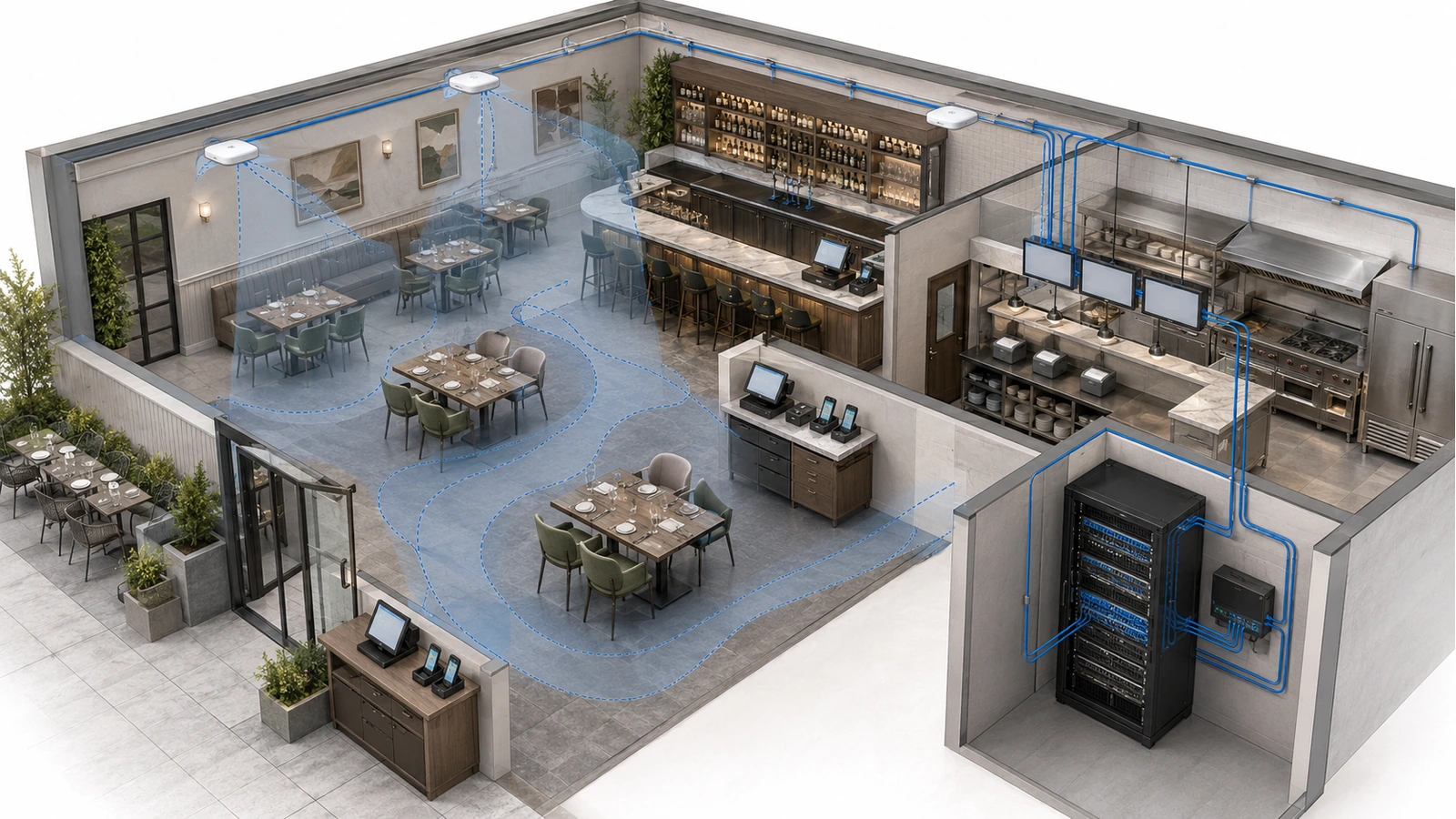
Wireless handhelds and payment devices allow staff to take orders and complete transactions throughout dining rooms, bars, patios, pool areas, and event spaces. Their reliability depends on more than a strong signal near each access point.
The design must consider the routes employees actually travel:
- Dining tables to server stations
- Indoor rooms to patios
- Bars to kitchens
- Private rooms to payment stations
- Pool decks or outdoor venues to interior spaces
- Elevators, corridors, or transitional areas in larger properties
Devices decide when to leave one access point and join another. The network can create appropriate coverage and assist roaming, but different handhelds may not transition identically.
Successful coverage requires:
- Adequate signal along the complete operational route
- Controlled overlap between neighboring access points
- Appropriate channels and transmit power
- Reliable wired backhaul
- Consistent security and network availability across required areas
- Testing with the actual approved POS devices
Kitchen equipment, metal walls, refrigeration, fire doors, crowds, and outdoor transitions can alter performance. A survey conducted in an empty restaurant may not reveal conditions during live service.
The property should test ordering, synchronization, and payment workflows while walking representative routes—not merely confirm that the Wi-Fi icon remains visible.
05 Separate POS Without Confusing Security and Capacity
POS and payment-related systems should operate within controlled network boundaries appropriate to the vendor architecture and applicable security obligations.
A typical design may distinguish among:
- POS terminals and handhelds
- Payment devices
- Kitchen production systems
- Management workstations
- Guest Wi-Fi
- Entertainment and streaming systems
- Surveillance and physical security
- Vendor administration
- Network management
These boundaries may be implemented through VLANs, routing, firewalls, access controls, or physically separate vendor infrastructure. The appropriate model depends on the POS platform, payment design, contractual responsibility, and operating environment.
Guest devices should not be able to reach POS systems. Vendor access should be limited to approved destinations. Network-management interfaces should not be directly accessible from ordinary POS, guest, or entertainment environments.
Segmentation improves security and troubleshooting, but it does not inherently reserve bandwidth or wireless airtime. Guest and POS devices connected to the same access point still share radio resources. Several separated networks using one internet circuit can still compete for upstream capacity.
Where necessary, traffic management, application policy, access-point capacity, internet sizing, and wired placement should support the logical boundaries.
Segmentation Is a Boundary, Not a Bandwidth Guarantee
Separating POS from guests protects access and simplifies troubleshooting. Reliable performance still requires adequate wireless airtime, switch capacity, gateway resources, and internet service.
06 Protect Kitchen Order Delivery
Kitchen technology is often where a network problem becomes an immediate operational failure. A delayed or missing ticket can affect preparation time, order accuracy, staff communication, and guest satisfaction.
Kitchen systems may include:
- Thermal or impact printers
- Kitchen display stations
- Order-routing controllers
- Expeditor displays
- Label printers
- Inventory or production devices
Wired connectivity is generally preferable for stationary kitchen equipment when the environment and device support it. Wireless equipment can perform reliably when coverage is validated, but it adds another variable in an area already affected by metal, heat, grease, moisture, and physical activity.
Printer failures are not always network failures. Paper, covers, cutters, print heads, heat, grease, power supplies, addressing, POS routing, drivers, print services, and cabling can all create similar symptoms.
Documentation should show which menu items or production groups route to each printer or display. Testing should confirm normal orders, modified items, duplicate handling, rerouting, and recovery after a device or network interruption.
The dedicated Kitchen Technology and Printer Reliability guide examines these conditions in greater depth.
07 Stabilize Power and Equipment Locations
A brief power interruption may restart the internet service terminal, firewall, switches, access points, POS stations, kitchen devices, or payment terminals. Even when power returns immediately, those components may recover at different speeds and in an unexpected order.
Backup-power planning should identify:
- Which POS functions must remain available
- Every infrastructure component required to support them
- The expected battery runtime
- Electrical circuits and generator coverage
- Safe shutdown or degraded-operation procedures
- Battery monitoring, testing, and replacement
Connecting only the firewall to a UPS does not preserve POS operations if the modem, switches, access points, terminals, or kitchen systems lose power.
Equipment locations also affect reliability. Infrastructure should be protected from heat, liquids, grease, cleaning chemicals, tampering, accidental unplugging, and cable damage. Power strips and adapters should not be left loose beneath counters or near wet-service areas.
A secured and organized equipment location makes it easier to identify power dependencies, replace failed hardware, and prevent staff or vendors from disconnecting the wrong component.
08 Plan for Internet and Platform Failures
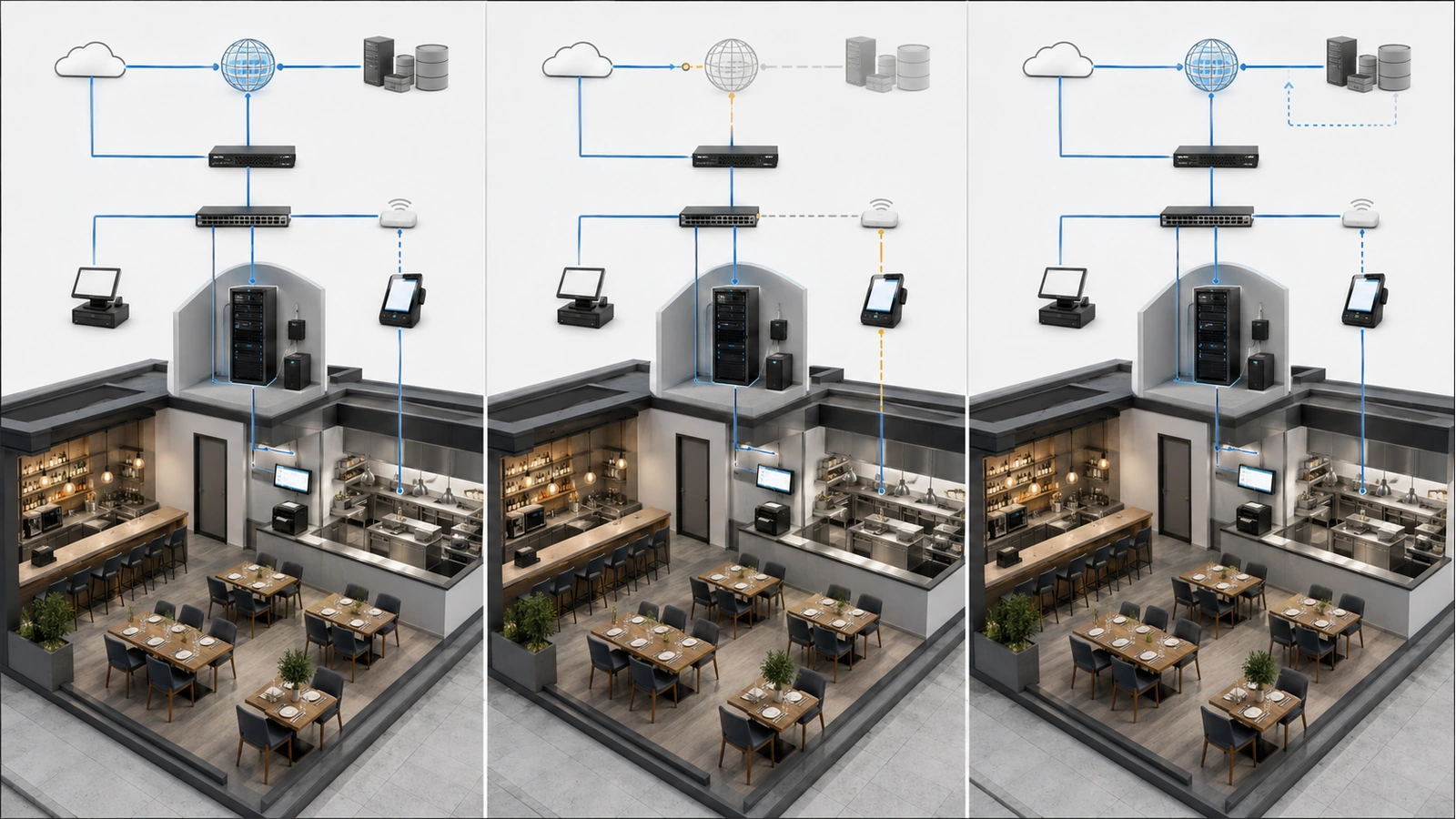
Cloud-based POS systems may depend on internet access for payments, synchronization, online ordering, reporting, authentication, or management. A backup internet connection can reduce the impact of a primary-provider outage, but it does not protect against every failure.
Failover may not preserve active sessions. Applications may need to reconnect after the public address or network path changes. Payment or POS platforms may have specific requirements for backup connectivity.
The property should determine:
- Which POS functions continue without internet access
- Whether offline payments are supported and under what restrictions
- How queued orders or transactions synchronize later
- Which external integrations become unavailable
- Whether the backup path supports required destinations and security controls
- Which nonessential services should be limited during failover
- How staff identify and operate during degraded service
Offline payment behavior involves financial and operational risk and should follow the approved POS and payment-provider procedures. It should never be assumed from a marketing statement alone.
A cellular connection must be tested at the installed location and during realistic busy periods. A second wired provider should be evaluated for actual physical and upstream diversity.
Failover also cannot restore an unavailable POS platform, payment processor, DNS provider, or other shared external service. Continue with Failover Internet for Restaurants and Hospitality Properties for the complete continuity framework.
09 Test the POS Network Under Operational Conditions
A POS network is not validated simply because terminals connect before opening. Testing should reproduce the movement, device usage, traffic, and failure conditions the business may experience during service.
POS Network Deployment Checklist
- Document every POS, payment, kitchen, and integration dependency
- Confirm vendor-approved network, addressing, security, and internet requirements
- Use documented wired connections for fixed devices where practical
- Record device locations, switch ports, addresses, owners, and functions
- Validate wireless coverage along actual staff movement routes
- Test roaming, ordering, and payments with approved production devices
- Verify guest, entertainment, surveillance, and administrative boundaries
- Confirm internet, gateway, switch, access-point, and endpoint power protection
- Test primary-provider failure and restoration
- Verify vendor-documented offline or degraded-operation procedures
- Test kitchen routing, printing, display delivery, and device recovery
- Document support ownership and escalation for each service layer
Testing should include representative transaction volume, concurrent handheld use, movement between service areas, outdoor operation where applicable, kitchen production, guest demand, and entertainment traffic.
The team should also test controlled failures: disconnect a network path, interrupt the primary internet service, restart an access point, remove a kitchen endpoint, or simulate loss of an external service where approved. Record what staff observe, which alerts appear, and how recovery occurs.
Configuration backups, diagrams, vendor contacts, circuit information, device records, and recovery steps should remain available even when the primary network or cloud documentation platform cannot be reached.
Stable POS networking is achieved through a reliable service path, not extreme bandwidth or one expensive appliance. When wired infrastructure, wireless mobility, security boundaries, power, internet continuity, kitchen delivery, and operational procedures are designed together, the POS environment becomes easier to support during the moments when failure would matter most.
The next article extends that continuity planning beyond POS to the property’s wider internet-dependent environment: Failover Internet for Restaurants and Hospitality Properties.