
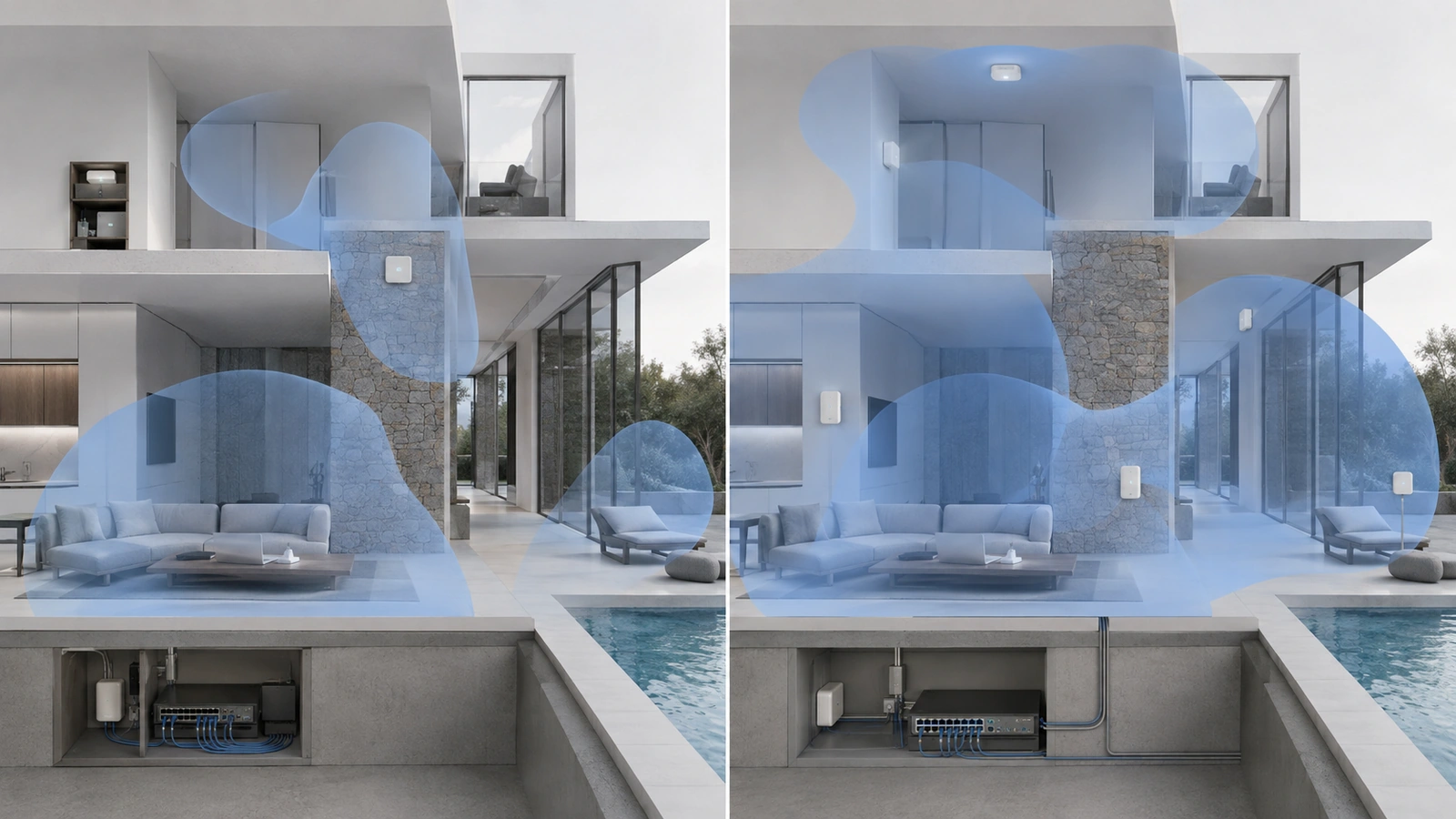
Premium access points cannot correct every poor installation decision. A technically capable device mounted inside a metal enclosure, behind dense construction, or far from the people it serves may perform worse than simpler equipment positioned around the actual coverage requirement.
Placement affects more than signal strength. It influences usable capacity, channel reuse, interference, roaming transitions, backhaul options, maintenance access, and the amount of wireless energy extending into areas that do not need service.
At the same time, placement should not become the explanation for every Wi-Fi complaint. Client behavior, radio congestion, cabling, switch capacity, power, gateway performance, internet service, and applications can produce similar symptoms.
The lesson is not merely to install access points centrally. It is to place each one according to a defined operational purpose and then validate the complete service path.
Key Takeaway
Access points should be positioned around users, construction, capacity, mobility, backhaul, and service boundaries—not simply where cabling is easiest or equipment is least visible.
01 Define the Coverage Objective Before Choosing a Location
An access point should have a specific purpose. It might serve a residential living area, office, clubhouse meeting room, restaurant dining space, corridor, pool deck, parking structure, or outdoor gathering area.
For each area, the design should identify:
- Who and what must connect
- Where users and devices are normally located
- Expected occupancy and active demand
- Applications that must remain reliable
- Whether users move between coverage areas
- Construction materials and major obstructions
- Mounting, pathway, and aesthetic restrictions
- Outdoor or environmental exposure
A single access point may cover a large open room adequately while failing in a smaller space divided by concrete, masonry, mirrors, metal shelving, or fire-rated assemblies.
Square footage can help define scope, but it cannot determine access-point quantity or location by itself. Two properties of identical size may require completely different wireless designs.
02 Understand How the Building Changes the Signal Path
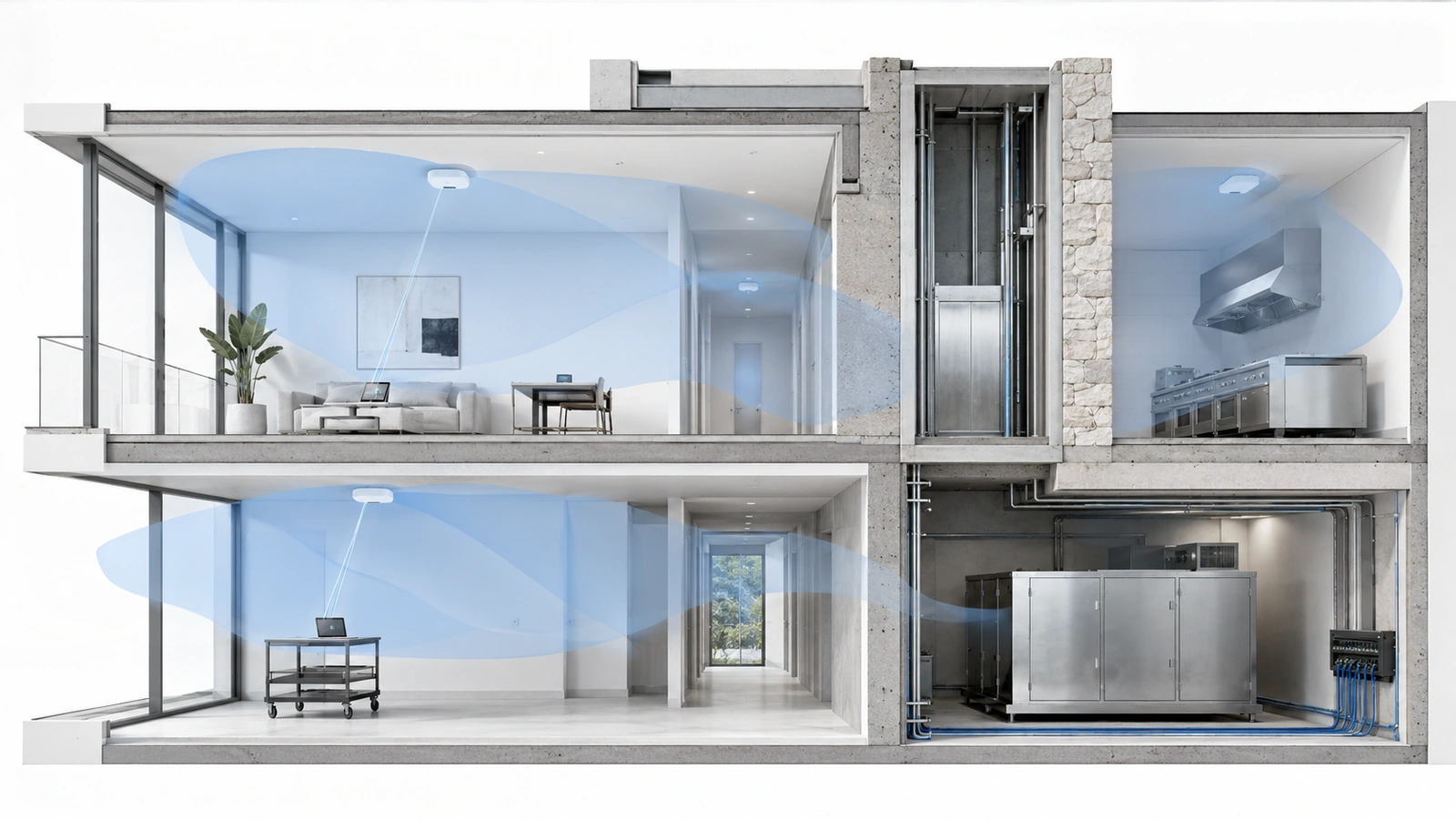
Wi-Fi does not spread through every property in a clean circle. Signals weaken, reflect, and travel through alternate paths depending on the surrounding materials and geometry.
Significant influences may include:
- Concrete walls and floor slabs
- Metal framing, doors, cabinets, and shelving
- Elevator shafts and mechanical cores
- Stone, tile, mirrors, and coated glass
- Large appliances and refrigeration equipment
- Water features and occupied seating areas
- High ceilings, atriums, corridors, and stairwells
- Exterior walls, landscaping, and neighboring buildings
A stronger access point cannot make those materials disappear. Increasing transmit power may allow the client to hear the access point farther away while the client device still lacks the ability to communicate back reliably.
High power can also enlarge the area in which the network competes for airtime. The objective is sufficient two-way communication within the intended service area—not maximum signal everywhere.
03 Recognize Common Placement Risks
Locations selected for convenience are not automatically unsuitable. A corridor access point can serve a corridor effectively. A garage-mounted device can serve a garage. The problem appears when that location is expected to cover spaces it cannot serve reliably.
| Placement Choice | Potential Risk | When It May Be Appropriate |
|---|---|---|
| Inside a closet or cabinet | Attenuation, heat, poor orientation, and difficult service access | Only when the enclosure and coverage objective have been validated for that equipment |
| At one end of the property | Long signal paths and weak performance in distant rooms | When the intended service area is concentrated near that location |
| Hallway or corridor | Signal may travel along the corridor but fail through dense room walls or doors | For corridor service or verified adjacent-space coverage |
| Garage or mechanical area | Heat, metal, equipment interference, and poor paths into occupied spaces | When serving that operational area from a suitable protected position |
| Very high mounting | Overshooting intended users, excessive reach, obstruction, and difficult maintenance | When antenna behavior, distance, and service access support the design |
| Near an exterior window | Coated glass, reflections, and uncontrolled outdoor coverage | When measured performance meets a limited and intentional exterior objective |
Aesthetic concerns matter, especially in homes, clubhouses, restaurants, resorts, and premium common areas. Good design balances appearance with radio performance and future maintenance rather than hiding equipment until it can no longer perform its function.
04 Plan Coverage and Capacity Together
A device can display a strong Wi-Fi signal while the network performs poorly. Coverage indicates that communication is possible; it does not prove that enough wireless airtime exists for every active user and application.
Capacity planning should consider:
- Concurrent active users rather than only total registered devices
- Application demand and sensitivity to delay
- Busy periods, events, and seasonal occupancy
- Slow or distant clients consuming additional airtime
- Channel width and reuse
- Neighboring access points and external networks
- Wired uplink and gateway capacity
Too few access points can create overloaded cells, weak edges, and long signal paths. Too many can create unnecessary overlap, channel contention, difficult roaming, higher cost, and additional management complexity.
Every additional access point should solve a defined coverage or capacity problem. Quantity should emerge from the design rather than become the design.
Signal Is Not the Same as Capacity
An access point may reach a large space without having enough airtime to serve its active users. Placement and quantity must address both coverage and demand.
05 Design for Mobility and Client-Controlled Roaming
In larger homes, communities, hospitality properties, and shared facilities, users may move between rooms, floors, buildings, or indoor and outdoor areas while remaining connected.
Access-point placement influences whether those transitions are possible, but client devices ultimately decide when to roam. Some devices leave a weakening connection quickly; others remain attached to a distant access point longer than expected.
Reliable mobility requires:
- Continuous coverage along the intended movement path
- Controlled overlap between neighboring cells
- Consistent network availability where roaming is required
- Appropriate channel and transmit-power planning
- Compatible security and authentication behavior
- Applications capable of tolerating the transition
Testing should follow actual movement paths: room to room, lobby to conference area, indoor dining to patio, residence to pool, or corridor to elevator lobby.
A Wi-Fi icon remaining visible does not prove application continuity. Voice, video, POS, and real-time operational applications should be tested directly.
06 Include Backhaul, Cabling, and Power in Placement
An ideal radio location is not useful if it cannot receive reliable network connectivity and power. Placement must be coordinated with the wired infrastructure.
A properly installed access point may require:
- A standards-appropriate cable path
- Verified termination and link performance
- Sufficient switch and uplink capacity
- An adequate Power over Ethernet budget
- Protected pathways and serviceable mounting
- Environmental conditions within equipment requirements
- Backup power where continuity justifies it
Wired backhaul generally provides the most predictable access-point connection. Mesh or wireless bridging can be appropriate when new cabling is impractical, but the backhaul link must operate through the same radio environment and physical obstacles affecting client devices.
A mesh node placed inside a dead zone may have too little upstream connectivity to improve it. The node should be positioned where it can both reach the primary system reliably and serve the intended area.
Placement decisions made during construction should reserve suitable cable routes before ceilings and walls are closed. In existing properties, a survey may reveal that pathway improvements are necessary before the preferred wireless design becomes feasible.
07 Treat Outdoor Coverage as Its Own Environment
Pool decks, patios, courtyards, gatehouses, parking areas, event lawns, and outdoor gathering spaces should not automatically depend on indoor signal escaping through doors or windows.
Outdoor placement should consider:
- Intended coverage boundaries
- Occupancy and operational demand
- Mounting height and orientation
- Landscaping and seasonal changes
- Nearby buildings and competing networks
- Heat, rain, humidity, salt, dust, and ultraviolet exposure
- Protected cabling, terminations, and pathways
- Grounding, surge, electrical, and structural requirements
- Access for inspection and replacement
An outdoor-rated access point is not a complete outdoor design. The mount, cable, enclosure, power, surge strategy, pathway, and maintenance plan must also match the environment.
Outdoor electrical, grounding, lightning-protection, mounting, and code requirements should be coordinated with qualified professionals.
08 Validate Placement Before and After Installation
Predictive wireless modeling can estimate coverage when floor plans, materials, access-point characteristics, and design assumptions are accurate. It remains a model rather than final proof.
Where practical, temporary access-point placement can help validate difficult areas before permanent cabling and mounting are completed. Existing buildings can also be surveyed to measure actual attenuation, interference, and neighboring networks.
Post-installation validation should examine:
- Coverage in required areas and difficult edges
- Client connection quality in both directions
- Channel utilization and retransmissions
- Access-point load and uplink behavior
- Movement between coverage areas
- Performance with representative client devices
- Conditions during realistic occupancy
- Outdoor and seasonal service requirements
One laptop or phone cannot represent every client. Specialized handhelds, smart devices, cameras, older clients, and battery-powered sensors may have different radio capabilities.
09 Diagnose Before Relocating or Adding Hardware
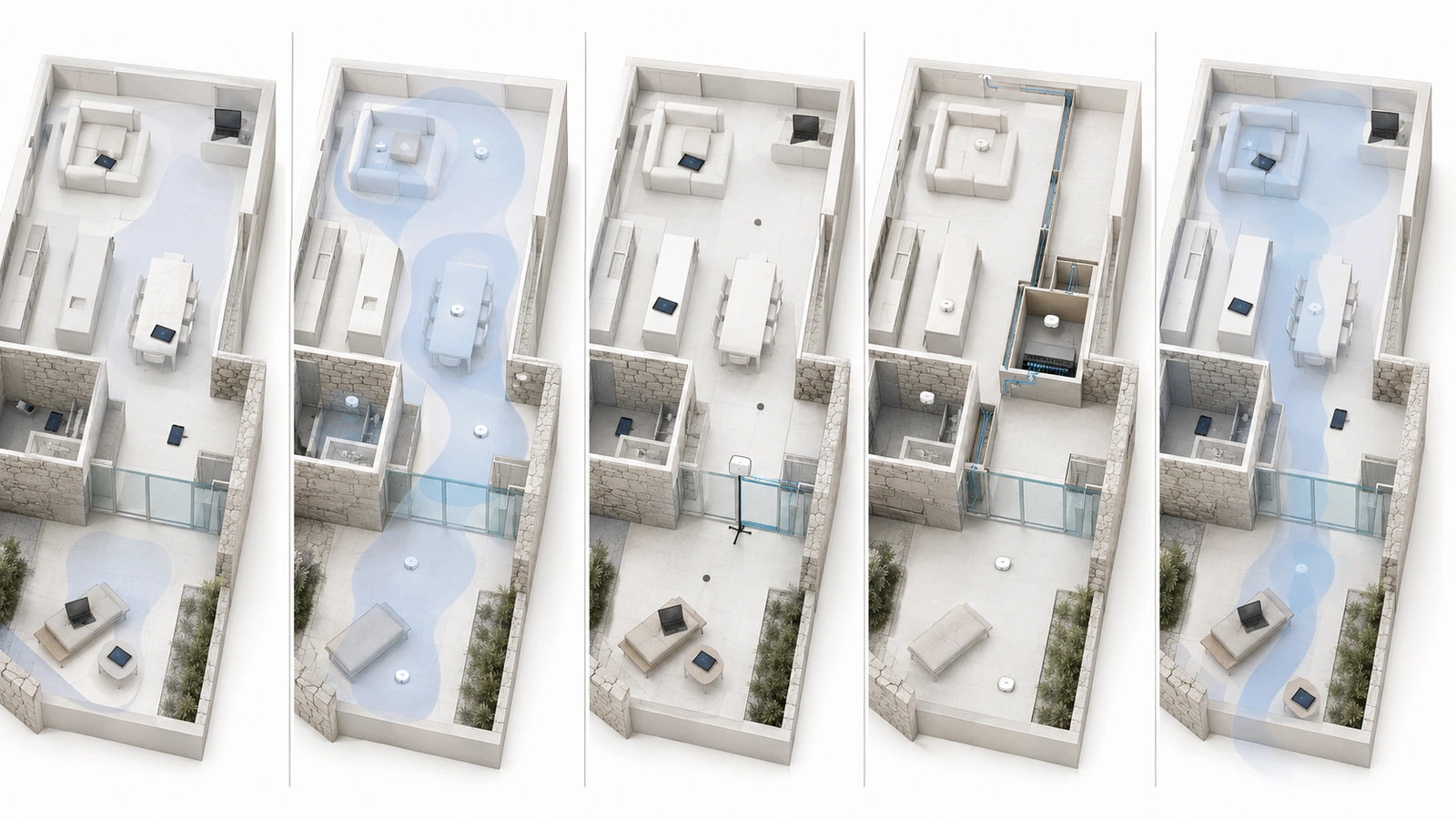
Placement should be evaluated alongside the rest of the service path. A location change will not correct an overloaded gateway, damaged cable, insufficient PoE, ISP congestion, or external application outage.
Access-Point Placement Review Checklist
- Define the users, devices, applications, and movement paths for each area
- Review construction materials and significant obstructions
- Distinguish coverage requirements from capacity requirements
- Identify neighboring networks and channel-reuse constraints
- Verify mounting orientation, height, environmental suitability, and service access
- Confirm wired backhaul, cabling, switch, uplink, and PoE capacity
- Validate mesh or wireless backhaul paths where used
- Test indoor, transition, and outdoor areas with representative devices
- Observe roaming through real operational movement paths
- Compare wireless results with wired, gateway, ISP, and application health
- Document access-point locations, cables, ports, settings, and intended service areas
- Reassess the design after layout, occupancy, or infrastructure changes
Useful troubleshooting records include the location, time, affected device, application, serving access point, signal conditions, and whether nearby users experienced the same symptom.
Relocation may be the correct solution when the access point is obstructed, poorly oriented, too distant, or serving the wrong area. A new access point may be justified when measured coverage or capacity requires another cell. Configuration adjustments may be enough when the physical layout is sound.
Expensive Wi-Fi deployments fail when premium hardware is expected to compensate for missing design. Reliable wireless service comes from matching access-point locations to the building, users, applications, pathways, and operating conditions—and then validating the result.
The next article examines another weakness that makes even a technically sound deployment expensive to support: The Hidden Cost of Undocumented Networks.