
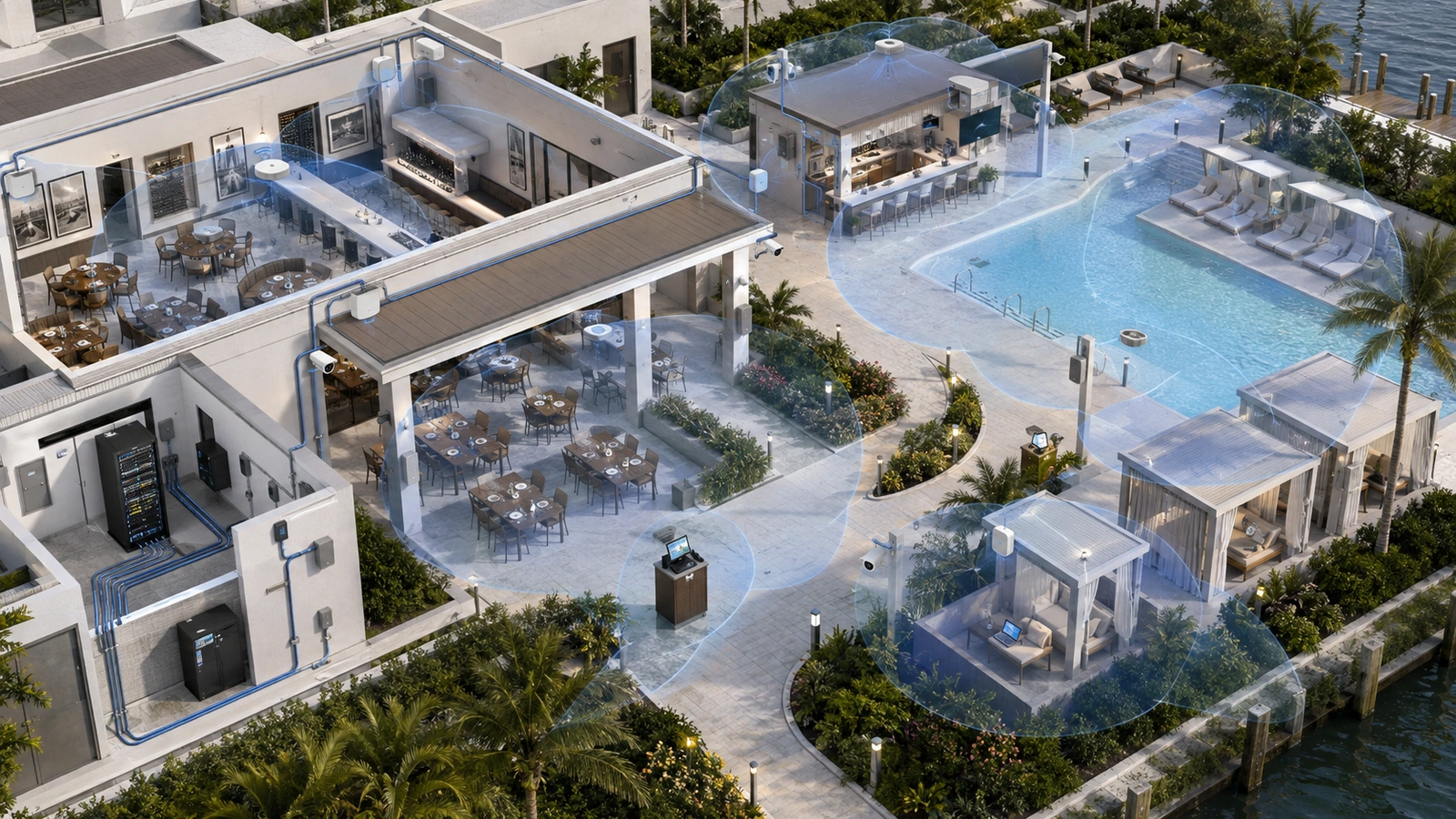
Outdoor hospitality spaces are active operating environments. Restaurant patios, pool decks, cabanas, outdoor bars, terraces, event lawns, and waterfront seating may depend on Wi-Fi for orders, payments, reservations, staff communication, guest access, audio, televisions, cameras, and management systems.
Yet outdoor coverage is frequently treated as signal that happens to escape from the building. A phone may display Wi-Fi near a doorway while a handheld terminal disconnects at the far tables or the guest network becomes unusable when the patio fills.
Reliable outdoor Wi-Fi requires its own coverage, capacity, environmental, cabling, and operational plan. It must also coordinate with the indoor network because staff and devices continually move between the two environments.
The busy-hour conditions behind many of these problems are explained in Why Restaurant Wi-Fi Fails During Busy Hours.
Key Takeaway
Outdoor Wi-Fi should be designed as a dedicated service environment connected to the property’s wider infrastructure—not as leftover signal from an indoor access point near a window.
01 Define the Outdoor Service Requirements
The project should begin by identifying who and what must connect in each outdoor area.
Potential users and systems include:
- Guests using internet access
- Servers carrying handheld POS devices
- Mobile payment terminals
- Hosts using reservation or table-management tablets
- Outdoor bar and service-station equipment
- Security cameras and access-control devices
- Streaming televisions and digital signage
- Audio players, controllers, and amplifiers
- Facility or environmental systems
- Temporary event-production equipment
Each service has a different priority. A guest browsing the internet and a server processing a table payment occupy the same physical patio, but they do not have the same security, mobility, or continuity requirements.
The design should define:
- The boundaries of the intended coverage area
- The expected occupancy and concurrent activity
- The operational applications that must work
- The staff movement routes between indoor and outdoor spaces
- The expected performance during events and peak service
- Which organization supports each connected system
Coverage should not extend farther than necessary without a purpose. Excessive outdoor reach can increase interference, expose the service beyond the intended property, and make channel reuse more difficult.
02 Treat Each Outdoor Space Differently
Outdoor hospitality areas do not share one universal design.
| Outdoor Environment | Typical Requirements | Primary Design Challenge |
|---|---|---|
| Restaurant patio | Guest access, handheld POS, payments, and indoor-to-outdoor mobility | Doors, exterior walls, full seating, and frequent staff transitions |
| Pool deck and cabanas | Long guest dwell time, bar service, streaming, cameras, and broad coverage | Large open areas, reflective water, heat, mounting restrictions, and changing occupancy |
| Outdoor bar | Fixed and mobile POS, staff devices, audio, televisions, and guest access | High local demand, equipment concentration, moisture, and metal structures |
| Event lawn or terrace | Temporary high-density guest use, event staff, payments, and production systems | Large changes between normal and event occupancy |
| Waterfront or coastal area | Guest and operational connectivity across exposed seating or service zones | Salt, humidity, wind, corrosion, storms, and limited mounting locations |
A small patio may be served effectively from one carefully chosen outdoor location. A resort pool complex may require several controlled cells with distinct capacity and roaming objectives. An event lawn may need permanent backbone locations that support temporary access points during large functions.
Designing to the busiest conceivable event everywhere can create unnecessary cost and radio density. A better strategy distinguishes normal operation from planned temporary expansion.
03 Place Access Points Around Use, Not Convenience
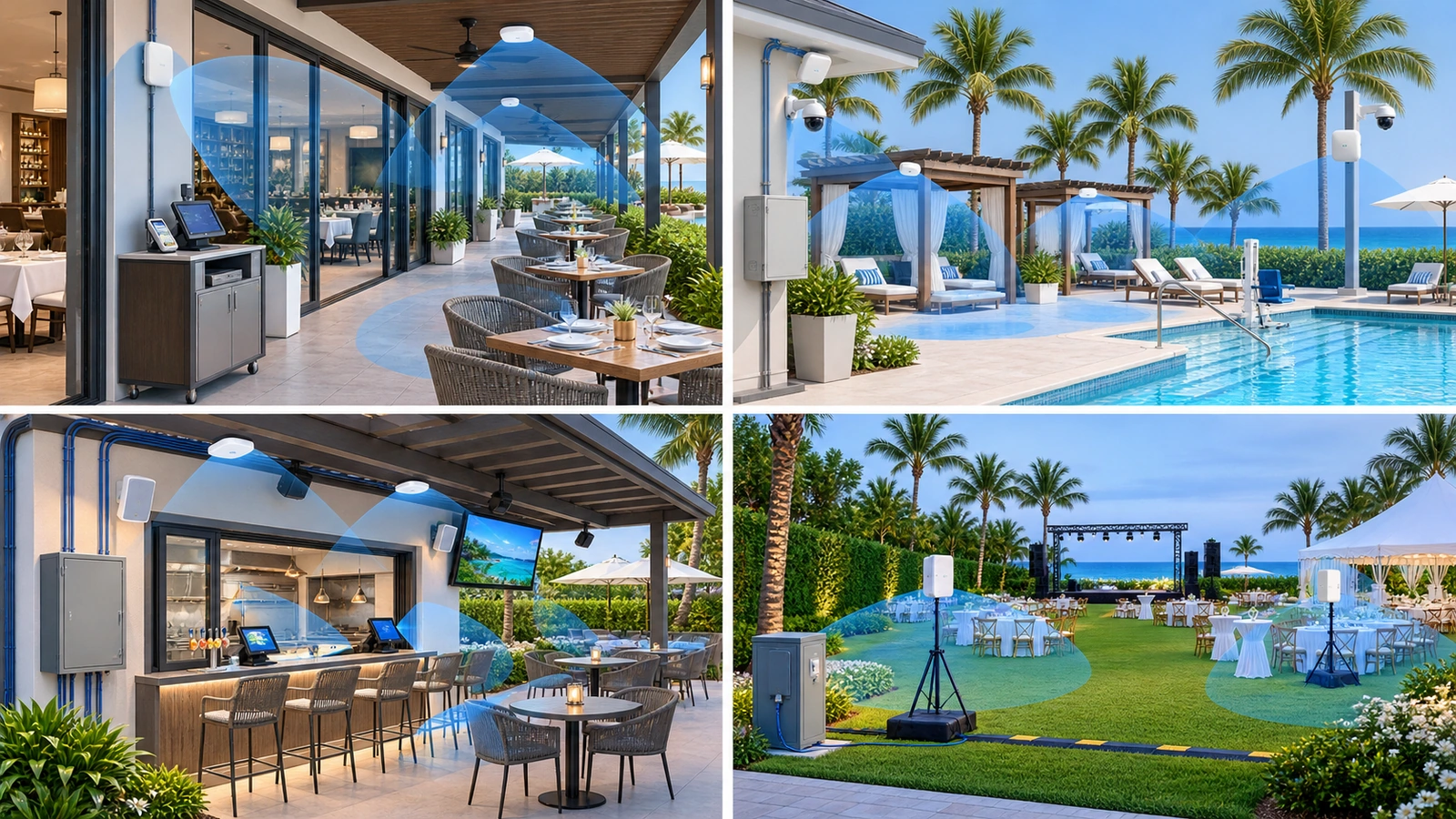
Outdoor access-point placement affects signal quality, capacity, interference, appearance, durability, and serviceability.
A mounting location should consider:
- Seating and standing areas
- Bars, host stands, and payment locations
- Staff movement and service routes
- Exterior walls, doors, columns, roofs, awnings, and landscaping
- Nearby buildings and wireless networks
- Mounting height and equipment orientation
- Access for inspection and replacement
- Protection from guests, carts, cleaning activity, and maintenance work
- Architectural and aesthetic restrictions
Higher mounting is not automatically better. An access point installed too high may overshoot the intended seating, create excessive coverage beyond the property, or become difficult to service. Equipment mounted too low may be obstructed, damaged, or tampered with.
Outdoor coverage should follow the antenna behavior and approved orientation of the selected equipment. A device mounted behind metal, inside a decorative enclosure, or beneath certain structures may behave differently from the original design assumptions.
Indoor access points can sometimes serve nearby exterior areas adequately. That outcome should be verified rather than assumed. Exterior walls, coated glass, doors, unit depth, and occupancy can make incidental coverage unreliable.
04 Engineer for Weather and Environmental Exposure
Outdoor equipment must tolerate the installed environment throughout its service life. A general “outdoor-rated” description is only the beginning of that evaluation.
Potential exposures include:
- Direct or wind-driven rain
- Heat and solar loading
- Humidity and condensation
- Salt air and corrosion
- Ultraviolet exposure
- Dust, insects, and landscaping debris
- Pressure washing and cleaning chemicals
- Wind, vibration, and storm conditions
Cable entrances and drip paths should not direct water into equipment or building penetrations. Connections, enclosures, mounts, and fasteners should be appropriate for the exposure and inspected periodically.
Coastal environments deserve particular attention. Corrosion may affect mounting hardware, connectors, grounding components, enclosures, and cable shields even when the access point itself remains operational.
Weather-rated equipment should still be positioned intelligently. Shade, overhangs, protected mounting surfaces, and accessible locations can reduce exposure without enclosing the device in a way that interferes with radio performance or heat dissipation.
05 Build Reliable Cabling, Backhaul, and Power
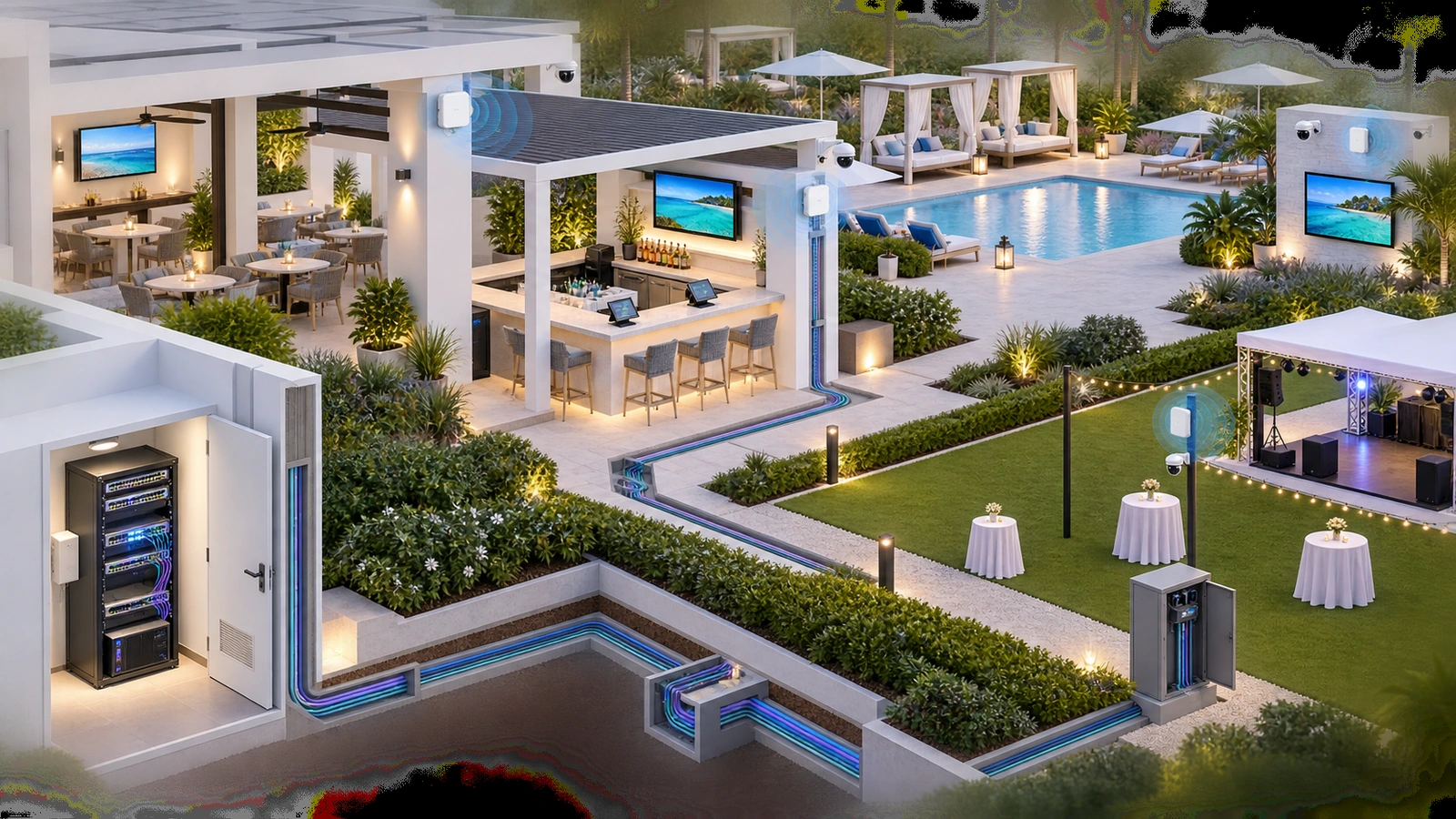
Outdoor Wi-Fi depends on the connection behind the access point. Wired Ethernet or fiber-fed distribution generally provides the most predictable backhaul.
The infrastructure plan should address:
- Protected indoor-to-outdoor cable pathways
- Cable type appropriate to the route and environment
- Conduit, support, and separation where required
- Weather-resistant transitions and terminations
- Distance and link-performance requirements
- Power over Ethernet capacity
- Switch and uplink capacity
- Grounding, bonding, and surge-protection coordination
- Spare pathways or connection points for expansion
Wireless bridges can be useful where trenching or cabling is impractical and an appropriate path exists. They introduce additional alignment, interference, mounting, power, weather, and support dependencies. A bridge should be selected intentionally rather than used as a substitute for examining available pathways.
Outdoor switches or enclosures require environmental, electrical, thermal, security, and maintenance planning. Installing indoor equipment inside a generic sealed box can create condensation or heat problems.
Electrical, lightning-protection, grounding, mounting, structural, and code requirements should be coordinated with qualified professionals for the specific property.
Outdoor-Rated Equipment Is Not a Complete Outdoor Design
Reliable service also depends on protected pathways, suitable terminations, power delivery, surge planning, mounting, environmental exposure, and practical maintenance access.
06 Coordinate Indoor and Outdoor Mobility
Staff may carry a handheld from the dining room through an exterior door, across the patio, to an outdoor bar, and back inside. The device should retain access to the required operational service throughout that route.
Reliable mobility depends on:
- Coverage through transition areas
- Controlled overlap between indoor and outdoor access points
- Consistent operational network availability
- Appropriate channel and transmit-power planning
- Client-device roaming behavior
- Application tolerance for brief network transitions
The client device ultimately decides when to change access points. Wireless infrastructure can assist the transition but cannot make every handheld behave identically.
Testing should use the actual approved POS and payment devices. A phone may roam successfully where a specialized terminal hesitates or remains attached to a distant indoor access point.
The test should confirm application behavior, not only wireless association. An access-point transition may complete while the POS application or payment session still requires reconnection.
For the complete POS workflow, see POS Network Design: Stability First, Speed Second.
07 Separate Services and Protect Shared Capacity
Outdoor guest access should remain logically separated from POS, staff, cameras, audio, facility systems, and network administration.
That separation can prevent guests from reaching operational devices and makes troubleshooting clearer. It does not automatically reserve radio airtime, switch capacity, gateway resources, or internet bandwidth.
A crowded patio may contain guest and operational devices connected to the same access point. The design should provide enough capacity for both and may apply appropriate guest restrictions or traffic policies.
The property should consider:
- Guest internet access and client isolation
- Protected POS and payment connectivity
- Staff operational services
- Camera and security communication
- Audio, television, and signage requirements
- Facility and vendor-managed devices
- Administrative and monitoring access
Broadcasting many wireless network names is not necessarily the best way to represent these services. The architecture may use identity, device assignment, logical segmentation, and access policy while keeping the wireless presentation manageable.
08 Include Cameras, Audio, TVs, and Events
Outdoor network planning should account for every connected system using the same pathways, switches, power sources, and uplinks.
Cameras may generate sustained local traffic to a recorder. Audio systems may depend on controllers, streaming services, or synchronized endpoints. Televisions and digital signs may consume consistent internet bandwidth. Temporary events may add payment stations, production systems, ticketing, or guest demand.
Where practical:
- Wire fixed cameras, televisions, audio equipment, and signs
- Reserve wireless capacity for devices that need mobility
- Document which systems require local discovery or special communication
- Confirm switch, uplink, PoE, and internet capacity
- Provide planned connection points for temporary events
- Define who may connect temporary vendor equipment
Temporary event infrastructure should not bypass normal security and change controls merely because it will be present for one evening. Unapproved routers, switches, hotspots, and wireless bridges can affect permanent operations.
Outdoor audio and television planning is covered further in Restaurant Audio, TVs, and Streaming Systems: Network Planning Basics.
09 Commission and Maintain Outdoor Wi-Fi
Outdoor Wi-Fi should be tested after the final furniture, landscaping, architectural features, and equipment are in place. Validation should also reflect representative occupancy.
Outdoor Hospitality Wi-Fi Checklist
- Define guest, POS, staff, camera, entertainment, and facility requirements
- Map normal occupancy, peak periods, events, and staff movement routes
- Document intended coverage boundaries and areas intentionally excluded
- Verify access-point rating, orientation, mounting, and service access
- Inspect cable pathways, penetrations, terminations, and weather protection
- Confirm PoE, switching, uplink, internet, and backup-power capacity
- Coordinate grounding, surge, electrical, and structural requirements
- Test indoor-to-outdoor movement with actual operational devices
- Validate guest isolation and access to operational services
- Test performance during representative occupancy and temporary events
- Document equipment, cables, ports, configurations, and ownership
- Schedule recurring inspection for damage, water, corrosion, and landscaping changes
Seasonal changes can alter the environment. Vegetation grows, furniture moves, temporary structures are added, and nearby wireless systems change. Coastal exposure and storms can also degrade mounts, connectors, pathways, and enclosures.
Monitoring should distinguish wireless coverage problems from cabling, power, switch, gateway, internet, and application failures. Staff reports should identify the location, time, device, workflow, and observed symptom.
A reliable outdoor strategy gives guests useful connectivity while protecting operational workflows. It supports staff mobility, matches capacity to actual use, survives the environment, and remains accessible for maintenance.
The next article moves from exterior exposure to the most demanding interior environment in many restaurants: Kitchen Technology and Printer Reliability in Hospitality Environments.