
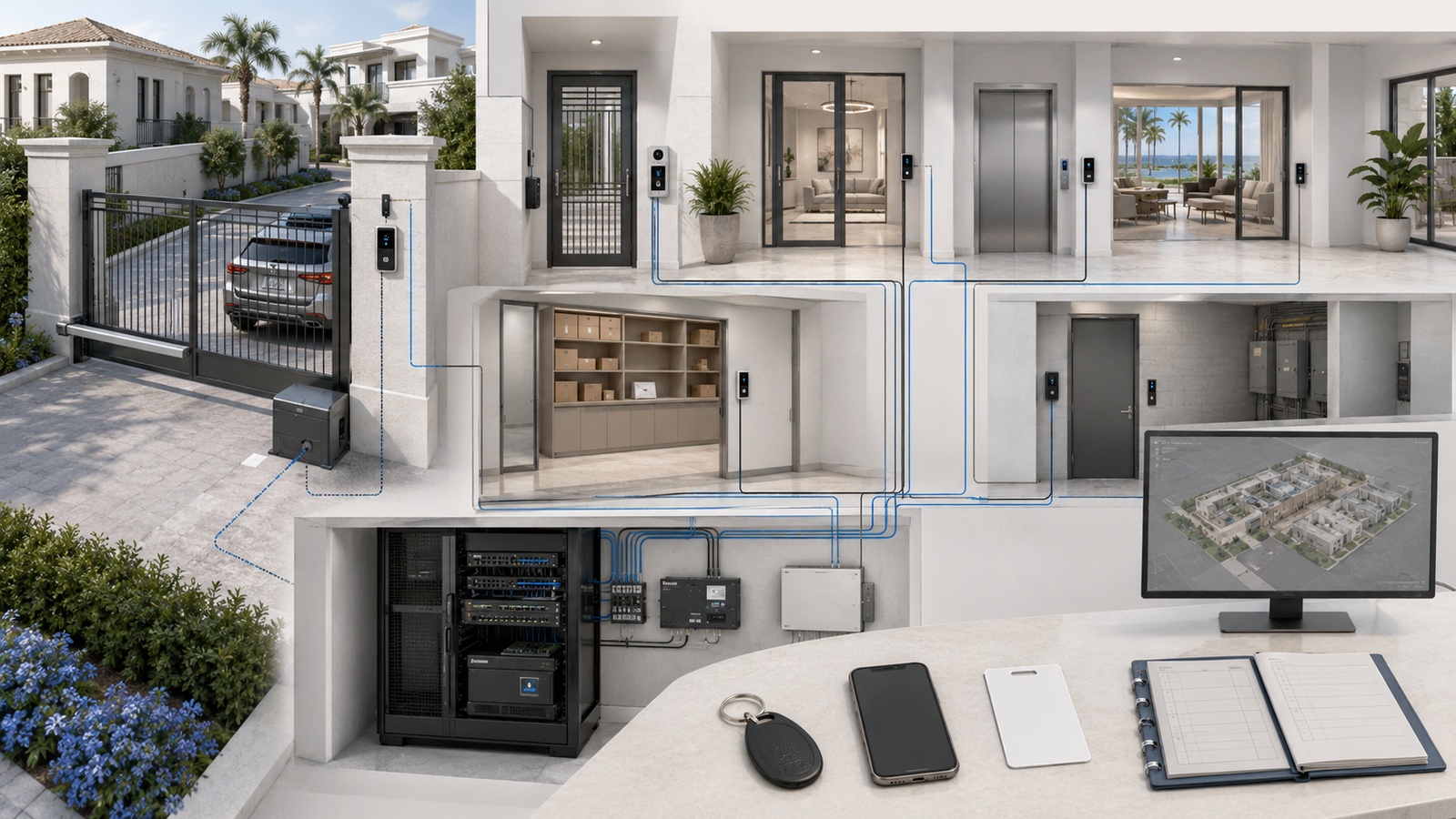
Residential access control has expanded far beyond replacing a metal key with a card or mobile application. Modern systems may regulate vehicle entrances, building doors, elevators, amenity areas, package rooms, garages, service spaces, equipment rooms, and other controlled zones across a property.
When designed well, access control makes permissions easier to administer, improves accountability, supports temporary access, and reduces the disruption caused by lost keys or personnel changes. When designed poorly, it can create locked-out residents, unreliable visitor entry, uncontrolled vendor credentials, and dangerous confusion during power, network, or emergency events.
The reader mounted beside a door is only the visible edge of the system. Reliable operation depends on credentials, controllers, locks, door hardware, networking, power, software, administrative procedures, and life-safety coordination working together.
Key Takeaway: Access control is not merely an electronic lock. It is a complete operational system governing who may enter, where they may go, when access is valid, and what happens when normal infrastructure fails.
01 What Residential Access Control Includes
Access control is the process of identifying a person or authorized device, evaluating its permissions, and allowing or denying entry to a controlled area. The scale of the system should reflect the property and its actual operating requirements.
A private residence may control:
- Perimeter and driveway gates
- Primary and service entrances
- Garages and detached buildings
- Home offices or equipment rooms
- Guest accommodations
- Wine rooms, storage areas, or other restricted spaces
Communities and multifamily properties may extend control to:
- Vehicle and pedestrian entrances
- Residential buildings and elevators
- Clubhouses, fitness centers, and pools
- Package and mail facilities
- Parking garages and bicycle storage
- Maintenance, administrative, and mechanical areas
Access control should not be confused with every adjacent entry technology. A lock physically secures an opening. An access-control system determines whether an electronic credential is authorized. An intercom allows communication with a visitor. A visitor-management platform handles invitations or temporary permissions. These systems can integrate, but each performs a different function.
02 How an Electronic Access Decision Works
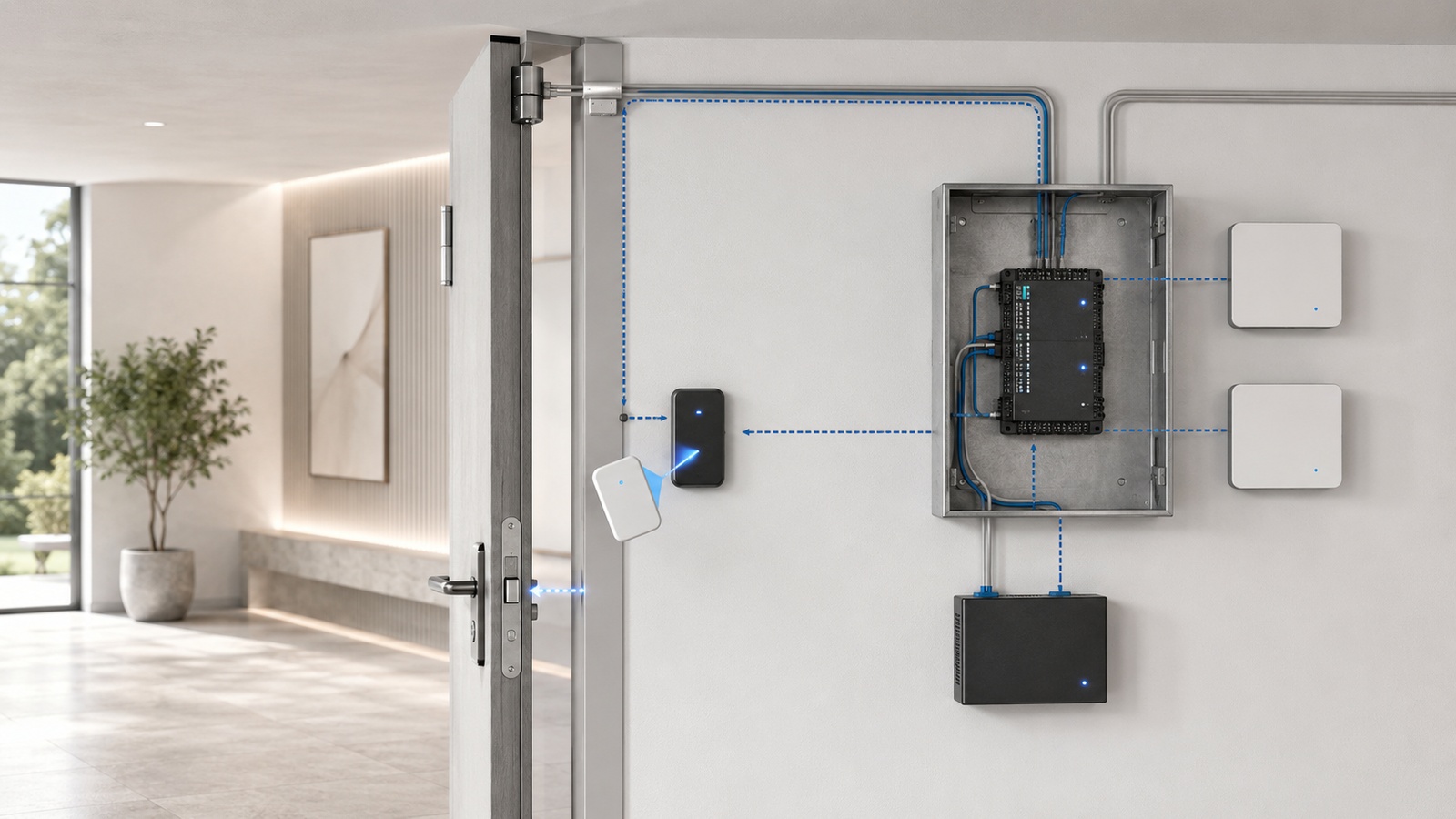
When someone presents a credential, several components participate in a process that usually takes only a moment.
- The reader captures a card, fob, mobile, PIN, or biometric identifier.
- The controller or management platform evaluates that identifier.
- The system checks the assigned door, schedule, status, and permission group.
- If authorized, the controller energizes or releases the appropriate locking hardware.
- A door-position sensor can confirm whether the opening actually changed state.
- The event is recorded for administration, troubleshooting, or investigation.
Typical infrastructure includes readers, request-to-exit devices, door contacts, locks, controllers, power supplies, management software, network connections, and administrative workstations. Gates and elevators require additional specialized components.
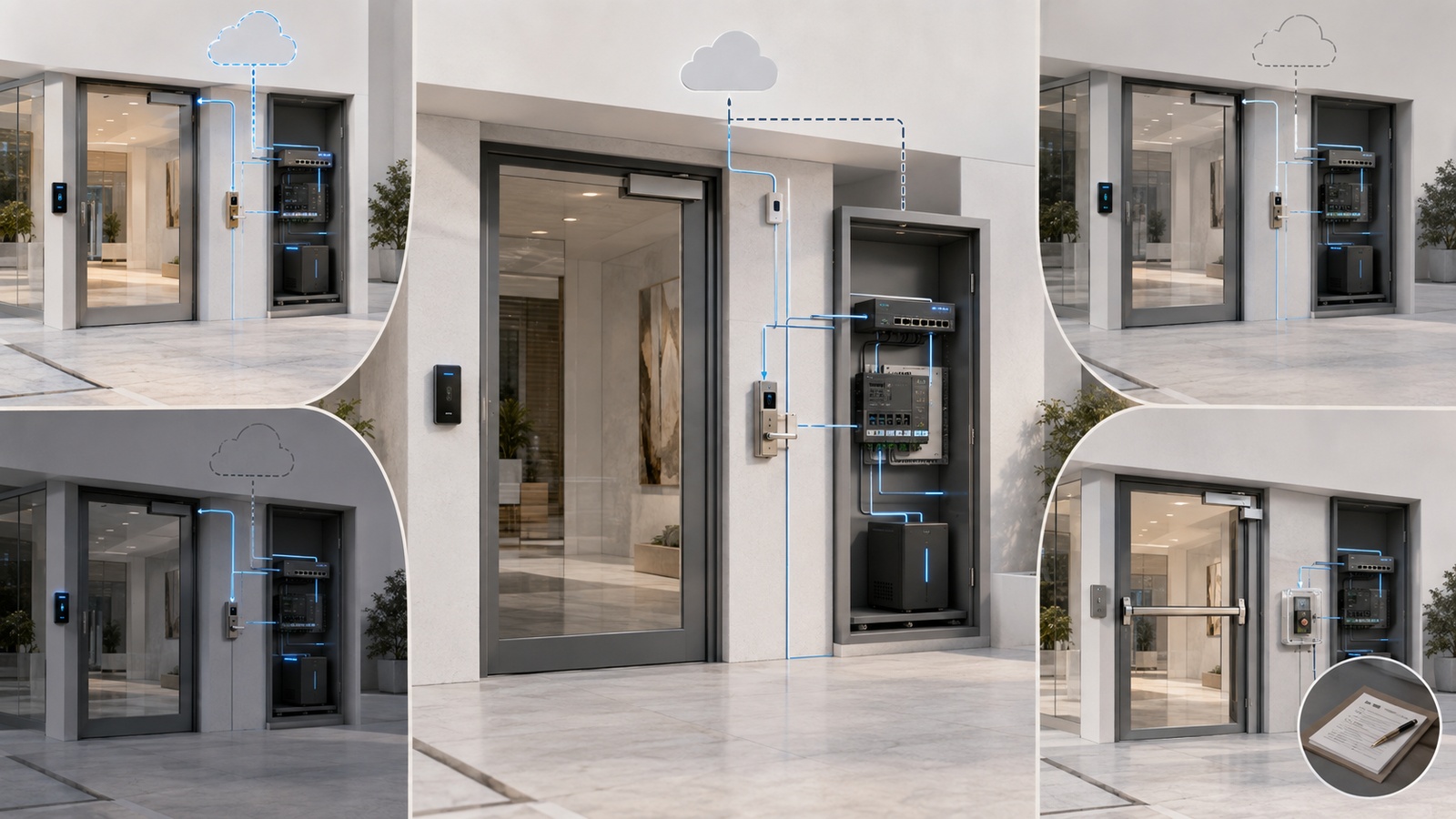
Local controllers are important because critical access decisions should not always depend on a live internet connection. Many professional systems download credential databases and schedules to the controller so authorized users can continue entering during an internet or cloud outage. Events may be stored locally and synchronized later.
This behavior is product- and configuration-dependent. Before selecting a platform, the property should verify exactly which functions continue when internet service, local networking, management software, or the vendor’s cloud platform is unavailable.
03 Choosing the Right Credential Methods
No credential is ideal for every user or opening. Many properties use a combination based on convenience, security, cost, and support requirements.
| Credential | Best Fit | Planning Considerations |
|---|---|---|
| Card or key fob | Residents, employees, recurring users | Simple to use, but can be lost, loaned, or left active |
| Mobile credential | Residents and smartphone-equipped staff | Convenient, but depends on enrollment, compatibility, battery, and user support |
| PIN | Temporary or secondary access | Easy to share; individual and expiring codes are preferable |
| Visitor pass or QR code | Guests, deliveries, scheduled vendors | Should have limited time, location, and reuse permissions |
| Biometric credential | Selected high-control environments | Requires careful privacy, legal, enrollment, and fallback planning |
| License plate | Vehicle-entry convenience | Should not be treated as infallible identity verification |
Mobile access is attractive because residents already carry phones, and permissions can often be issued remotely. However, a mobile-only design may create difficulty when a phone is lost, discharged, damaged, replaced, incompatible, or temporarily offline. The property should define an alternate entry method and a support process before launch.
PINs and shared codes are convenient but frequently become permanent when they were intended to be temporary. Individual, expiring credentials create better control and accountability than one broadly distributed gate or contractor code.
Higher-security credentials can reduce casual duplication, but the credential is only one part of the system. Weak administrator accounts, poorly protected controllers, propped doors, or uncontrolled mechanical keys can defeat an otherwise sophisticated credential technology.
04 Cloud, Local, and Hybrid Management
The management model determines where permissions, administration, reporting, and system intelligence reside. This decision affects internet dependency, maintenance requirements, remote support, subscription costs, and long-term flexibility.
| Model | Primary Advantage | Primary Responsibility |
|---|---|---|
| Cloud-managed | Convenient remote and multi-property administration | Verify subscriptions, internet dependencies, data ownership, and offline behavior |
| Locally managed | Greater local control and reduced cloud dependence | Maintain servers, software, backups, security, and recovery procedures |
| Hybrid | Remote administration with local decision-making or continuity | Understand which functions are local and which still rely on the vendor |
Cloud management does not automatically mean that doors stop working when the internet fails. Well-designed systems may continue validating previously synchronized credentials locally. Conversely, a locally hosted platform is not automatically more reliable if its server, backups, security, or maintenance are neglected.
Properties evaluating a platform should ask:
- Where are credentials and access events stored?
- Which functions work without internet connectivity?
- What happens if the vendor’s cloud service is unavailable?
- Can administrators export users, records, and configurations?
- Who owns the system account and tenant?
- What recurring subscriptions are required?
- How are software and controller updates handled?
- What happens if the integrator or vendor changes?
Vendor neutrality does not require eliminating every proprietary component. It means avoiding unnecessary dependency and preserving reasonable options for administration, cabling reuse, data recovery, and future replacement.
05 Resident, Guest, Staff, and Vendor Workflows
Access-control success depends as much on administrative discipline as on hardware. Every credential should have an identifiable owner, a defined purpose, appropriate locations, an activation date, and an expiration or review condition.
Resident workflows should cover onboarding, credential replacement, household changes, vehicle changes, amenity permissions, and move-out. Community policies should also clarify whether residents may issue guest access, how long invitations remain valid, and how suspected misuse is reported.
Temporary users need tighter boundaries. A pool contractor may need access to a service gate and equipment area on weekday mornings, but not to the clubhouse, residential buildings, or administrative offices. A delivery credential may need one entrance for a short window rather than unrestricted property access.
Vendor credentials should be:
- Assigned to an identifiable person or organization
- Limited to required doors and gates
- Restricted to approved days and hours
- Reviewed after projects or contracts end
- Disabled when no longer necessary
- Investigated when used unexpectedly
Emergency access requires separate coordination. Fire departments, emergency medical services, law enforcement, and utility responders may have specific local requirements. Those arrangements should be reviewed with the appropriate authority and qualified professionals rather than improvised through ordinary guest credentials.
Operational Note: A credential that was legitimately issued but never reviewed can become an undocumented permanent entry path. Credential lifecycle management is one of the most important access-control responsibilities.
06 Networking and Cybersecurity Requirements
Modern access-control platforms commonly use IP networks for controller communication, cloud administration, event reporting, intercom integration, and remote support. These systems should not be placed casually on an unrestricted network shared with guest Wi-Fi, resident devices, streaming equipment, or general-purpose IoT products.
A protected access-control environment may include:
- A dedicated operational network or security zone
- Firewall rules limited to documented communication requirements
- Consistent IPv4 and IPv6 protections
- Restricted controller and management-interface access
- Named administrator accounts
- Multifactor authentication where supported
- Configuration and database backups
- Logging for administrative and credential changes
- Controlled, temporary vendor remote access
- Regular software and firmware maintenance
A VLAN can create logical network separation, but routing and firewall policy must enforce the boundary. Network address translation is not a substitute for access policy, and broad inbound or reverse rules should not be added merely to accommodate troubleshooting.
Properties should document required communication between readers, controllers, management servers, cloud endpoints, intercoms, surveillance platforms, and administrative devices. Unexplained “allow everything” rules may make installation easier initially but weaken long-term security and accountability.
Further guidance appears in IoT Segmentation for Smart Buildings and Shared Infrastructure.
07 Power, Door Hardware, and Life Safety
Access control cannot be designed exclusively as an IT project. Electronic locks, fire-alarm interfaces, emergency release devices, door closers, exit hardware, accessibility requirements, and mechanical overrides all affect how the opening behaves.
Terms such as fail-safe and fail-secure describe how certain locking hardware reacts when power is lost. They do not mean that one mode is universally safer or correct. The appropriate behavior depends on the opening, occupancy, egress path, fire and building requirements, and the approved design.
Electronic access must never obstruct required emergency egress. System design and installation should be coordinated with qualified access-control, electrical, fire-alarm, door-hardware, and code professionals as applicable, along with the local authority having jurisdiction.
Continuity planning may include:
- Controller and lock power supplies with supervised batteries
- UPS protection for supporting network equipment
- Surge protection appropriate to the installation
- Generator-backed circuits where justified
- Mechanical override procedures
- Fire-alarm and emergency-release integration
- Documented response to controller or reader failure
- Periodic battery inspection and replacement
Outdoor readers, gate controllers, and enclosures require additional protection from heat, moisture, insects, corrosion, lightning, and power fluctuations. Coastal and storm-prone properties should treat environmental protection as a fundamental design requirement.
08 Testing the Complete Entry Experience
Commissioning should verify the complete operating workflow rather than simply confirming that a reader unlocks a door. Tests should cover approved and denied access, abnormal conditions, administrative procedures, and realistic failures.
A thorough validation process includes:
- Correct permissions for every user group
- Access schedules, holidays, and expiration behavior
- Denied access at unauthorized doors and times
- Door-position, forced-open, and held-open reporting
- Request-to-exit and emergency-egress behavior
- Mobile credential enrollment and phone replacement
- Visitor invitation, intercom, and remote-release workflows
- Internet, cloud, controller, and network outage behavior
- Battery-backed runtime and power restoration
- Fire-alarm or emergency integration as required
- Event logging, alert delivery, and time accuracy
- Credential revocation and administrator recovery
Testing should use real operational scenarios. For example, a property can verify whether a scheduled vendor credential reaches only the intended service entrance, whether a departing resident loses every associated permission, and whether authorized entry continues during an internet outage.
Resident-facing instructions should also be tested. A technically capable mobile platform can still produce a poor experience if activation messages are confusing, support ownership is unclear, or alternative entry is unavailable.
09 Planning for Long-Term Management
Before choosing a platform, the property should inventory controlled openings, user groups, visitor volume, existing wiring, power, network availability, mechanical hardware, emergency requirements, and desired integrations. Product selection should follow those requirements.
Residential Access-Control Planning Checklist
- Identify every door, gate, elevator, and area that genuinely requires control.
- Define resident, guest, employee, contractor, delivery, and emergency workflows.
- Select credential methods with practical fallback options.
- Verify local operation during internet and cloud outages.
- Document reader, controller, lock, sensor, network, and power dependencies.
- Coordinate door hardware, emergency egress, fire integration, and accessibility requirements.
- Separate access-control infrastructure from unrelated network traffic.
- Protect administrator accounts and restrict vendor remote access.
- Provide appropriate battery backup, surge protection, and environmental protection.
- Create credential issuance, review, replacement, and revocation procedures.
- Assign internal ownership and vendor escalation responsibilities.
- Test both authorized and prohibited paths before acceptance.
- Store diagrams, configuration backups, warranties, subscriptions, and recovery procedures.
- Review active credentials and administrator accounts on a defined schedule.
Long-term documentation should include controlled-opening schedules, device and controller inventories, network diagrams, power sources, credential groups, administrator ownership, vendor contacts, subscriptions, configuration backups, and change history. Sensitive passwords should remain in an approved password manager rather than inside broadly distributed documents.
Access control delivers its greatest value when it is predictable for authorized users, difficult to misuse, understandable to administrators, and resilient during foreseeable failures. That requires coordinated infrastructure and disciplined operations—not simply sophisticated readers.
The next article examines the property’s most complex and visible controlled opening in greater detail: Designing Smart Gate and Entry Systems for Communities.