
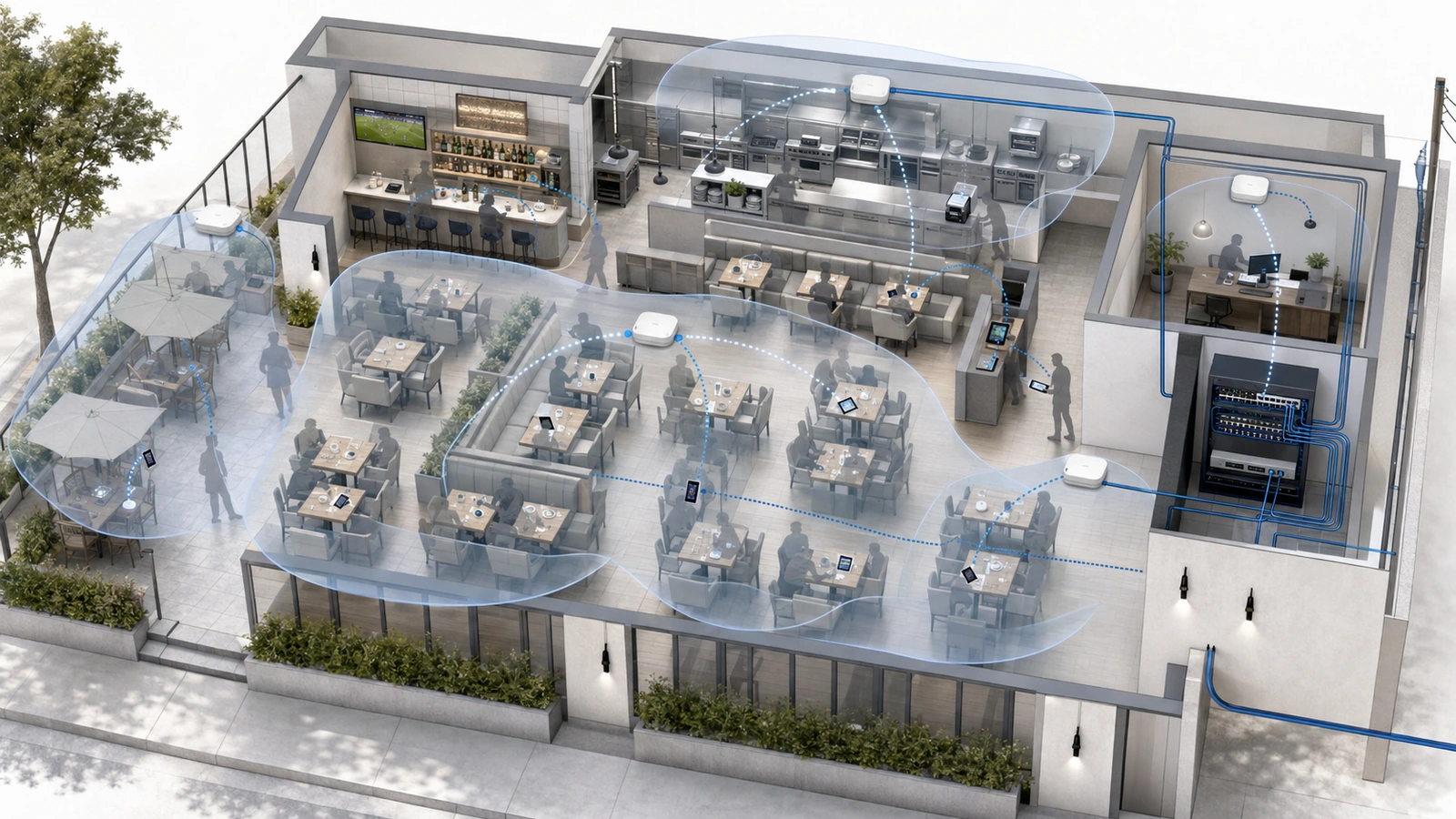
Restaurant Wi-Fi problems frequently appear when the business can least afford them. The network may seem healthy before opening, yet handhelds begin reconnecting, payments slow, guest service deteriorates, and streaming systems buffer once the dining room fills.
The obvious explanation is that the internet connection is too slow. Sometimes that is correct. In many cases, however, the failure occurs elsewhere: wireless airtime, access-point placement, roaming behavior, cabling, switching, gateway capacity, name resolution, an external platform, or the client device itself.
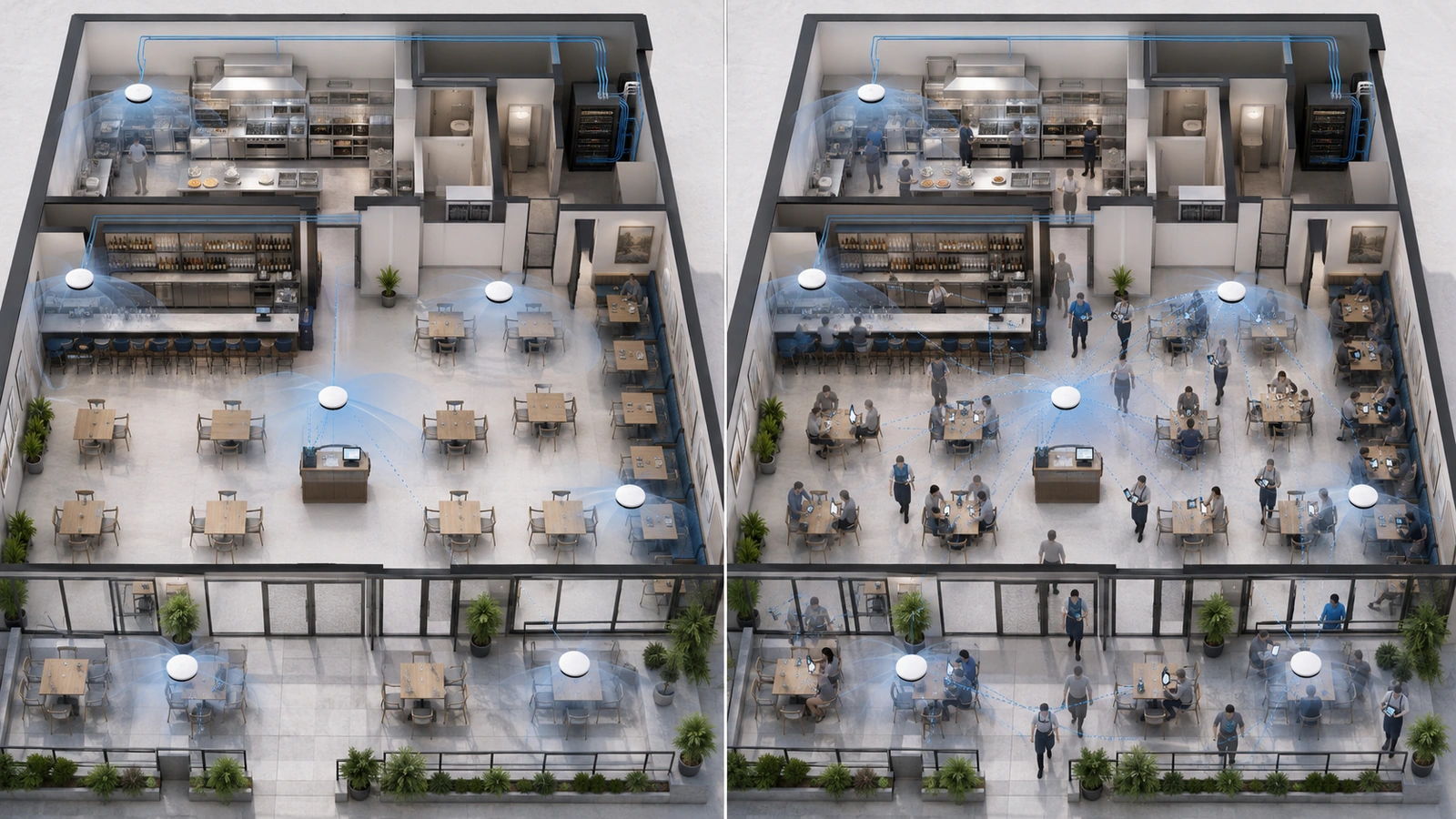
Peak service changes several conditions at once. More devices become active, staff move throughout the property, guests occupy spaces that were empty during testing, online ordering increases, televisions stream, kitchen production accelerates, and outdoor areas reach capacity.
The solution should follow the actual failure layer. Increasing internet speed will not repair poor radio coverage, just as adding access points will not resolve an unavailable payment platform.
Key Takeaway
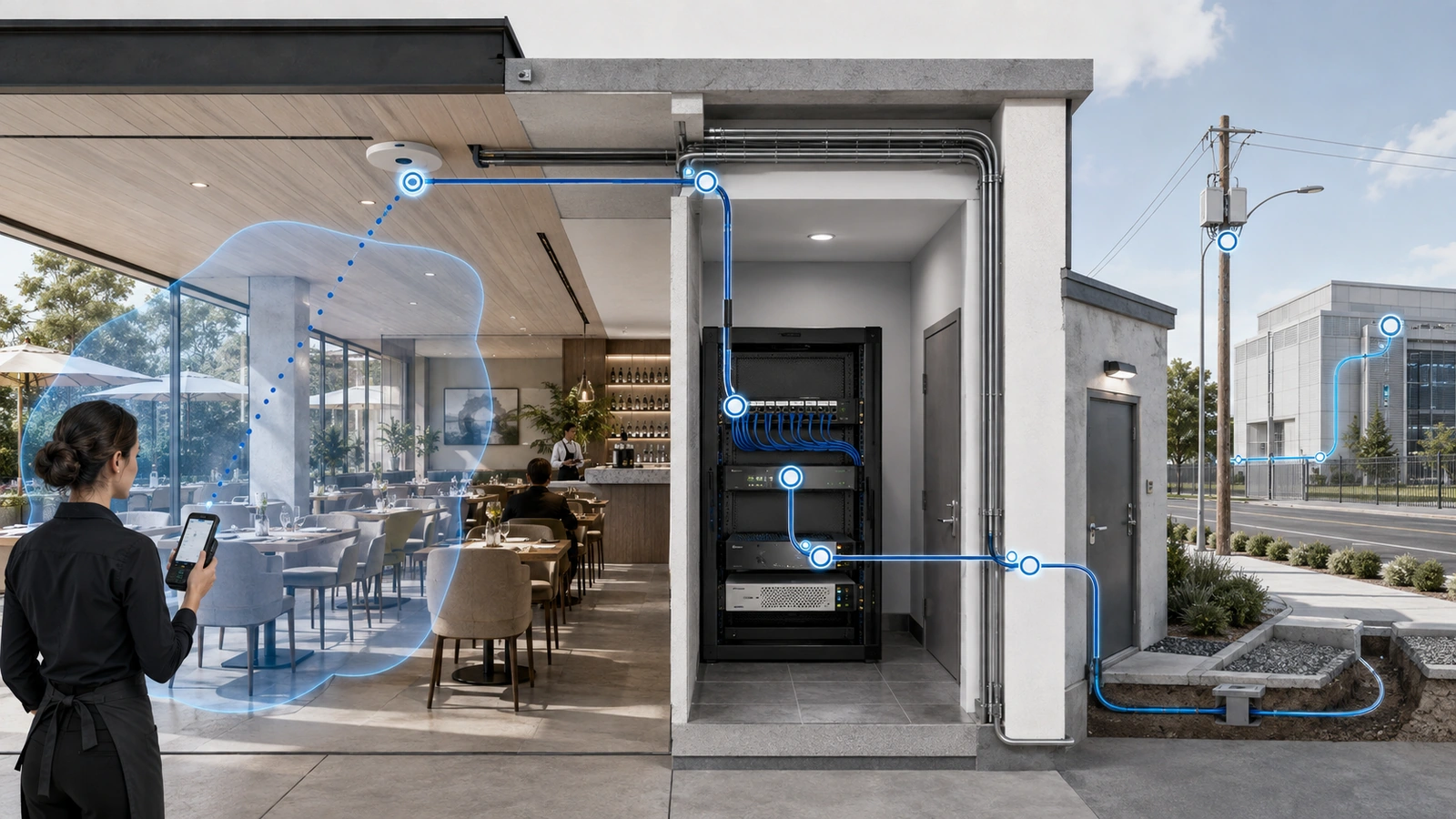
Busy-hour Wi-Fi should be diagnosed as a complete service path. The resident or staff device, radio environment, access point, wired backhaul, switch, gateway, internet provider, and application must be evaluated separately.
01 Understand What Changes During Busy Hours
A busy restaurant creates very different network conditions from an empty one.
Peak periods may introduce:
- More actively transmitting guest devices
- Concurrent handheld POS and payment activity
- Increased online ordering and reservation use
- Kitchen tablets, displays, and printers operating continuously
- Multiple televisions or streaming players consuming data
- Staff moving rapidly between coverage areas
- Full patios, bars, meeting rooms, or pool areas
- More physical obstruction from guests and staff
The number of connected devices alone does not determine performance. A connected phone sitting idle has a different impact from a device uploading media, streaming video, or repeatedly retransmitting because of a poor signal.
Wireless capacity is strongly influenced by airtime: the limited opportunity devices have to transmit over a shared channel. Slow or distant clients can consume disproportionate airtime because they need more time or repeated attempts to move the same amount of information.
Human bodies can also absorb and alter radio signals. An access point that covers an empty dining room adequately may behave differently when the room is full and devices are positioned below tables, inside pockets, or behind groups of guests.
02 Separate Wi-Fi from Internet Performance
Wi-Fi is the local wireless connection between a device and an access point. The internet connection begins beyond the local network. Either layer can cause poor application performance.
A restaurant may have:
- Excellent Wi-Fi but an overloaded internet circuit
- Weak Wi-Fi despite abundant internet capacity
- Healthy local and internet connectivity but an unavailable cloud platform
- A capable network with one malfunctioning handheld or payment device
Useful comparisons include:
- Wired performance versus wireless performance
- Operational devices versus guest devices
- One area of the property versus another
- Quiet periods versus peak service
- Local network communication versus external application access
- One application versus several unrelated services
If wired devices and all internet-dependent services slow simultaneously, the upstream connection or gateway deserves attention. If wired service remains healthy while one wireless area deteriorates, the issue is more likely related to radio coverage, capacity, backhaul, or access-point operation.
If only one vendor platform fails, the property should not assume the entire network is responsible.
03 Diagnose Airtime and Access-Point Capacity
Wi-Fi devices sharing a channel must coordinate their transmissions. During peak periods, congestion can develop even when the access point reports a strong connection and the internet circuit has unused capacity.
Common contributors include:
- Too many active devices within one coverage cell
- Guest devices generating high-volume traffic
- Slow clients consuming additional airtime
- Wide channels reducing reuse options
- Neighboring networks using the same or overlapping spectrum
- Legacy or specialized devices requiring less efficient communication
- Excessive retransmissions caused by weak or unstable connections
Adding another access point may help when the existing access point serves too much demand and the new device creates a properly planned coverage cell. It may hurt when the new access point is placed too close, uses unsuitable channels, or creates unnecessary overlap.
Monitoring should examine channel utilization, retries, client connection quality, data rates, access-point load, and performance by location. A single speed test cannot reveal all of these conditions.
| Observed Symptom | Possible Cause | Useful Diagnostic Check |
|---|---|---|
| Strong signal but slow service | High airtime utilization, retries, gateway congestion, or upstream limitation | Compare channel utilization, wired performance, gateway load, and ISP results |
| Problems in one room or zone | Coverage obstruction, overloaded access point, poor backhaul, or local interference | Test multiple devices in that area and inspect the serving access point and cable path |
| Handheld disconnects while moving | Coverage gap, excessive overlap, client roaming behavior, or authentication delay | Walk the real staff route while recording access-point transitions and application behavior |
| All services slow at once | Gateway, switching, DNS, ISP, or broad infrastructure problem | Compare wired and wireless devices, local services, external reachability, and equipment health |
| Only one application fails | Vendor platform, destination path, authentication, or application-specific issue | Test unrelated applications and review vendor service status and logs |
| Performance fails only at full occupancy | Capacity, airtime, physical obstruction, or peak upstream demand | Collect measurements during representative busy periods rather than before opening |
04 Evaluate Coverage and Access-Point Placement
Coverage must follow the property’s architecture and operating patterns. Kitchens, bars, dining rooms, private rooms, patios, and corridors each create different conditions.
Common placement errors include:
- Installing access points above metal ceilings or inside cabinets
- Hiding equipment near ductwork, refrigeration, or large appliances
- Attempting to cover several rooms through dense walls
- Placing access points according to available cabling rather than user demand
- Using indoor equipment to reach distant outdoor seating
- Creating excessive overlap by adding devices without redesigning channels and power
Kitchens are especially difficult because metal surfaces can block or reflect signals, equipment layouts change, and devices may be mounted near heat, grease, or moisture. Fixed kitchen devices should use wired connections where practical.
Coverage should also include transition areas. A handheld may work in the dining room and on the patio but disconnect at the doorway between them. Testing only at stationary points can miss that operational failure.
05 Test Staff Roaming with Actual Devices
Roaming is a cooperative process between the wireless infrastructure and the client device. The access points can provide consistent network availability and appropriate overlap, but the handheld decides when to transition.
Different POS terminals, payment devices, phones, and tablets may roam differently. Some remain connected to a distant access point longer than expected. Others may interrupt application traffic briefly while changing connections.
Testing should follow actual workflows:
- Start an order inside and continue outdoors
- Move from the bar to the kitchen
- Travel between dining rooms and server stations
- Process a payment near coverage boundaries
- Move through doors, corridors, and crowded transitions
The test should observe both wireless association and application behavior. A device may change access points successfully while the POS application still requires time to recover a session.
Authentication configuration, network consistency, signal thresholds, access-point placement, and client software can all influence the outcome.
A Wi-Fi Icon Does Not Prove Workflow Reliability
Operational testing should confirm that orders, payments, and synchronization continue while staff move—not merely that the handheld remains associated with a wireless network.
06 Separate Guest Access Without Overstating Segmentation
Guest Wi-Fi should remain logically separated from POS, staff, kitchen, surveillance, office, and network-management systems. Guests should receive controlled internet access without a path to operational devices.
That separation improves security and makes troubleshooting clearer. It does not automatically prevent guest activity from consuming shared resources.
Guest and operational services may still share:
- Wireless channels and access-point airtime
- Access-point processing capacity
- Switch uplinks
- Gateway resources
- DNS services
- Internet bandwidth
The design may therefore require appropriate guest limits, application policy, capacity planning, access-point density, or separate radio coverage in high-demand areas.
Too many wireless network names can also create overhead and administrative confusion. The property should broadcast only the services it needs and maintain clear ownership for each one.
Operational systems should not be moved onto guest Wi-Fi as a quick workaround. Temporary changes made during service should be reviewed and reversed through a documented process.
07 Inspect the Wired Network Behind the Wi-Fi
Every access point depends on the infrastructure behind it. A healthy radio connection cannot compensate for a failing cable, constrained uplink, unstable switch, insufficient power, or overloaded gateway.
The wired review should examine:
- Access-point cable testing and negotiated link state
- Switch-port errors and power delivery
- Uplink capacity and utilization
- Network loops or unmanaged switches
- Gateway processing and session load
- DHCP, DNS, and routing availability
- Internet utilization, packet loss, and latency
- Power, temperature, and equipment stability
Streaming televisions, cameras, audio systems, backups, and software updates can create sustained traffic behind the wireless system. Fixed high-demand endpoints should be wired when practical to preserve wireless airtime and simplify troubleshooting.
A restaurant using capable access points may still perform poorly when those devices connect through damaged cabling, low-capacity links, unstable power, or an improvised chain of switches.
08 Improve the Actual Failure Layer
Restaurant Wi-Fi problems do not always require a complete replacement. Targeted improvements are often more effective when they follow evidence.
Depending on the diagnosis, improvements may include:
- Relocating an access point
- Adding a properly planned capacity cell
- Removing unnecessary or interfering radios
- Adjusting channels, channel widths, or transmit power
- Repairing cabling or replacing an unstable switch
- Wiring fixed streaming, kitchen, or office equipment
- Providing dedicated outdoor coverage
- Applying appropriate guest traffic controls
- Upgrading a gateway that cannot support the operating load
- Increasing internet capacity when measured utilization supports it
- Replacing equipment that lacks required management, security, or capacity
Consumer equipment is not automatically incapable of supporting a very small restaurant. The concern is whether it provides the coverage, segmentation, monitoring, radio coordination, resilience, environmental suitability, and supportability the property requires.
Replacement should be based on demonstrated limitations rather than product classification alone.
09 Validate During Representative Service Conditions
A successful correction should be tested under the conditions that previously exposed the problem.
Busy-Hour Wi-Fi Assessment Checklist
- Record affected areas, devices, applications, times, and symptoms
- Compare wired and wireless performance during the same period
- Measure channel utilization, retries, connection quality, and access-point load
- Review gateway, switch, DNS, DHCP, and internet health
- Walk staff routes with the actual POS and payment devices
- Test indoor-to-outdoor and dining-to-kitchen transitions
- Compare guest, staff, POS, entertainment, and kitchen behavior
- Check fixed devices that should be moved from wireless to wired connections
- Review channel, power, and network-name configuration
- Verify that logical separation and traffic controls perform as intended
- Make one controlled change at a time where practical
- Retest during representative occupancy and document the result
Historical monitoring is especially valuable because busy-hour conditions may disappear before a technician arrives. Client events, access-point utilization, switch errors, gateway load, internet performance, and application timestamps can help reconstruct the incident.
Staff observations should be recorded precisely. “The Wi-Fi was bad” is difficult to investigate. “Three payment handhelds lost the POS application while moving through the patio doorway between 7:10 and 7:25 p.m.” provides a meaningful starting point.
Restaurant Wi-Fi becomes reliable when the property diagnoses the complete service path and validates improvements during real operations. Strong signal and fast internet are useful, but neither proves that airtime, roaming, backhaul, routing, applications, and devices will remain stable during peak service.
The next article focuses on one of the most common areas where those limitations appear: Outdoor Dining Wi-Fi Strategy for Restaurants and Resorts.