
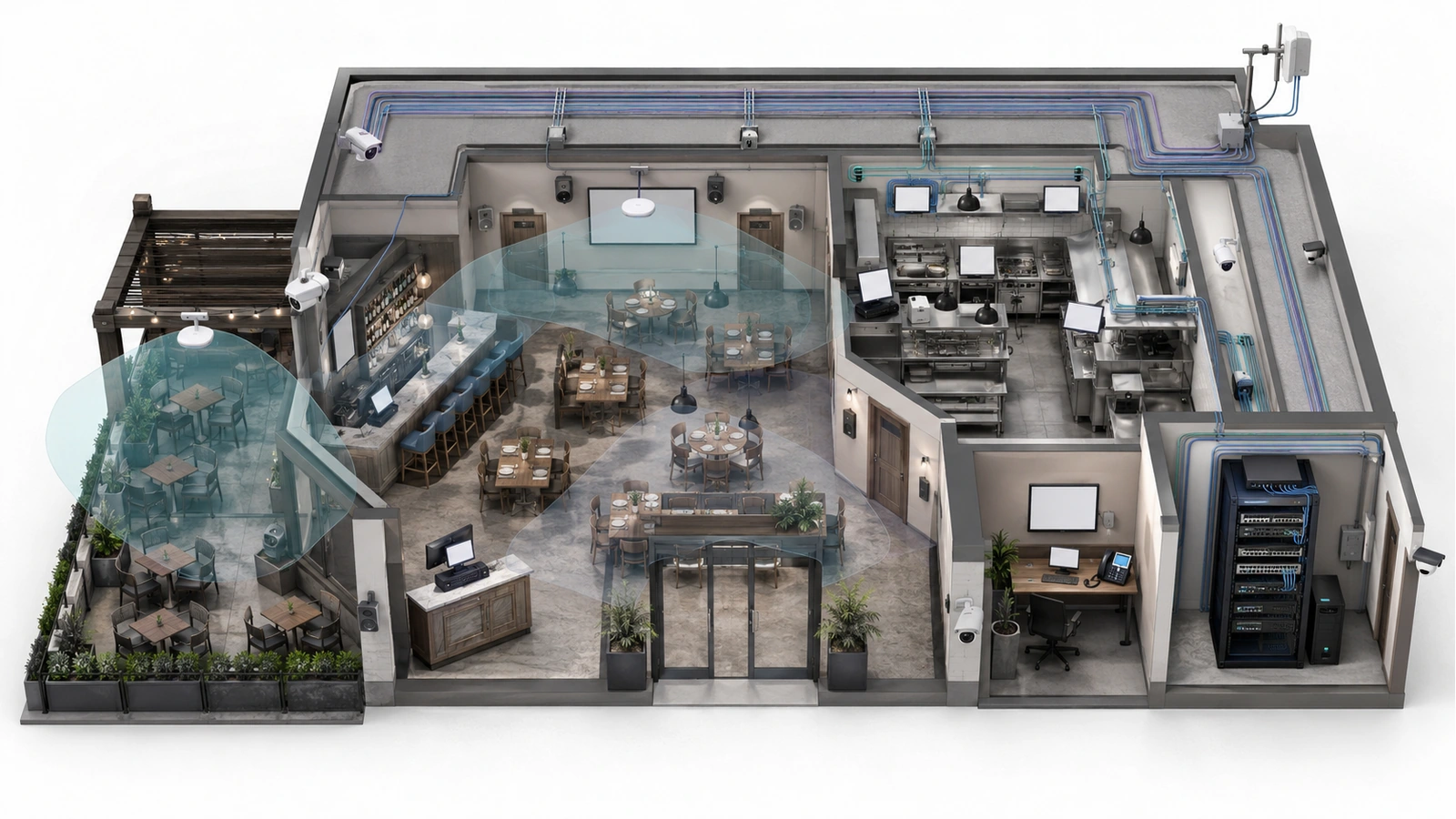
Restaurant and hospitality technology is no longer a collection of optional conveniences. Point-of-sale systems, payments, kitchen workflows, reservations, online ordering, phones, Wi-Fi, surveillance, audio, televisions, and cloud platforms now participate directly in daily operations.
When the infrastructure beneath those systems is unstable, the result is not merely a slow computer. Orders may fail to reach the kitchen, payment terminals may disconnect, staff may lose access to reservations, entertainment may stop, and managers may be forced to coordinate several vendors during active service.
Reliable hospitality technology begins with a foundation that connects physical pathways, network architecture, power, internet service, security, documentation, and operational responsibility. The objective is not unnecessary enterprise complexity. It is predictable serviceability during the periods when the business depends on technology most.
Key Takeaway
Hospitality infrastructure should be designed around business workflows and failure consequences—not around an isolated equipment list. Every critical service needs a known path, owner, dependency chain, support boundary, and recovery procedure.
01 Map the Operational Technology Environment
The first step is to identify every technology-dependent workflow and determine what happens when it becomes unavailable.
A restaurant or hospitality property may rely on:
- Fixed POS terminals and wireless handhelds
- Payment devices and processor connections
- Kitchen printers and display systems
- Online ordering and delivery integrations
- Reservation, membership, or property-management platforms
- Staff computers, tablets, printers, and phones
- Guest Wi-Fi and captive portals
- Surveillance cameras and recording systems
- Access control, alarms, and intercoms
- Streaming televisions and digital signage
- Background music and zone-based audio
- Outdoor bars, patios, pool areas, and event spaces
- Vendor-managed appliances and remote support tools
These systems do not all have the same priority. A music interruption may be noticeable, while a payment or order-routing failure can alter the entire service workflow. The design should therefore classify systems according to operational importance, availability needs, data sensitivity, and support ownership.
The dependency map should also show which systems can continue locally during an internet outage. Offline behavior varies by platform, configuration, payment method, and vendor policy; it should be tested rather than assumed.
02 Build the Physical Infrastructure First
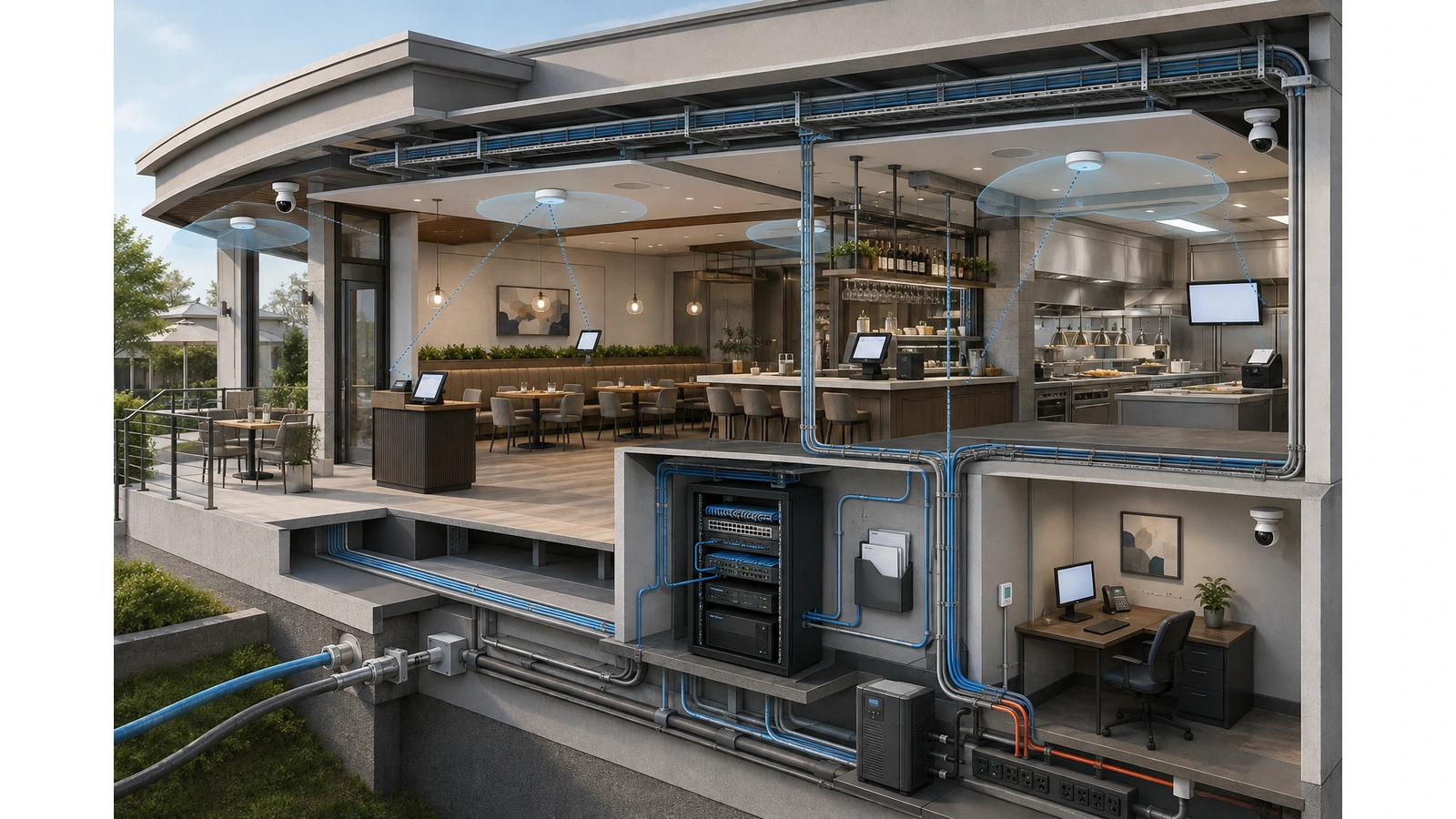
Applications and equipment will change more frequently than the building pathways supporting them. Cabling, telecommunications rooms, conduits, mounting locations, and electrical service should therefore be treated as long-term infrastructure.
A practical foundation may include:
- Structured copper and fiber cabling
- Documented pathways between operational areas
- Appropriate cabling for indoor, kitchen, and outdoor environments
- Centralized racks or secure equipment enclosures
- Patch panels and organized cable management
- Dedicated locations for gateways, switches, controllers, and recorders
- Serviceable access-point, camera, display, and audio locations
- Suitable electrical circuits and backup power
- Environmental protection from heat, moisture, grease, dust, and physical damage
Equipment should not be installed above hot kitchen appliances, beneath plumbing, inside inaccessible ceilings, or wherever an unused electrical outlet happens to exist. The location must support ventilation, maintenance access, cable organization, security, and safe replacement.
Wired connectivity should be used for fixed devices when practical. POS stations, printers, kitchen displays, televisions, audio components, cameras, and office workstations often benefit from predictable wired connections. Wireless remains essential for mobile terminals, tablets, guests, and locations where cabling is impractical, but it should not become the default for every device.
03 Separate Services According to Purpose and Risk
Many small hospitality environments begin with one router and one network. Additional devices are connected over time until POS, guests, cameras, office computers, streaming devices, kitchen systems, and vendor appliances all share the same environment.
This makes troubleshooting difficult and creates unnecessary security exposure. A guest device should not be able to reach POS terminals, cameras, printers, management computers, or infrastructure administration.
A practical design may establish separate environments for:
- POS and payment-related systems
- Kitchen production technology
- Staff and management operations
- Guest internet access
- Surveillance and physical security
- Audio, video, and digital signage
- Building or facility systems
- Vendor-managed equipment
- Network management
These environments may share switches, fiber, cabling, and internet circuits while remaining logically separated. VLANs are commonly used to organize that separation, but VLANs alone are not a complete security policy. Routing, firewall rules, administrative controls, and port assignments determine what may actually communicate.
Segmentation also does not automatically reserve internet bandwidth or wireless airtime. Guest traffic can still affect operations if both services share an undersized internet connection, access point, uplink, or gateway. Capacity controls and wireless design must complement security boundaries.
| Infrastructure Layer | Primary Purpose | Common Failure if Overlooked |
|---|---|---|
| Pathways and cabling | Provide protected, serviceable connections throughout the property | Improvised runs, unreliable wireless workarounds, and expensive retrofits |
| Switching and routing | Connect services and enforce intentional traffic paths | Loops, bottlenecks, flat networks, and difficult troubleshooting |
| Wireless access | Support mobile operations, guests, and appropriate wireless devices | Dead zones, contention, roaming failures, and peak-hour instability |
| Internet services | Connect cloud applications, payments, ordering, and remote platforms | Multiple workflows stop when one provider or path fails |
| Power and environment | Keep infrastructure operating under real facility conditions | Reboots, heat-related failures, damaged equipment, and incomplete failover |
| Operations and governance | Define ownership, access, documentation, support, and recovery | Vendor blame cycles, insecure access, and prolonged outages |
04 Prioritize POS and Kitchen Workflows
POS is often the most operationally important networked environment in a restaurant. Its reliability depends on more than internet speed.
The service path may include:
- Fixed terminals and wireless handhelds
- Local or cloud-based POS services
- Payment terminals and processors
- Kitchen displays and printers
- Order routing and online ordering integrations
- Switches, access points, gateways, and internet services
- DNS, authentication, and vendor cloud platforms
A failure anywhere in that chain can appear to staff as “the POS is down.” Clear network separation, stable addressing, reliable wired connections, validated wireless coverage, and documented vendor requirements make the source easier to identify.
Wireless handhelds require coverage along actual staff movement paths: dining rooms, server stations, bars, kitchens, patios, private rooms, and payment locations. A signal reading in an empty dining room does not prove the system will perform during full occupancy.
Kitchen environments add heat, grease, metal surfaces, refrigeration equipment, moisture, vibration, and frequent cleaning. Equipment selection, mounting, power, cable protection, and maintenance procedures must reflect those conditions.
For detailed planning, continue with POS Network Design: Stability First, Speed Second and Kitchen Technology and Printer Reliability in Hospitality Environments.
05 Design Wi-Fi Around Real Operating Conditions
Hospitality Wi-Fi must support several different experiences. Guests may remain seated while consuming internet capacity. Staff move rapidly while using operational devices. Kitchen equipment operates among reflective metal surfaces. Outdoor users connect across patios, pools, bars, and event spaces.
A wireless design should account for:
- Expected users and applications by area
- Peak occupancy rather than average traffic
- Staff roaming routes
- Wall, kitchen, window, and outdoor attenuation
- Access-point mounting and service access
- Channel reuse and transmit power
- Wired backhaul and Power over Ethernet capacity
- Guest and operational security boundaries
- Outdoor exposure and surge risk
Access-point quantity should follow coverage and capacity requirements. Too few access points can create weak or overloaded cells. Too many can increase contention and make roaming less predictable when power and channels are not coordinated.
Guest traffic should remain separated from business systems, but logical separation does not eliminate shared radio competition. If guest and operational devices use the same access points, the design must provide sufficient airtime and capacity for both.
Outdoor service should not be assumed to work because an indoor access point is visible through a window. Glass treatments, exterior walls, mounting height, vegetation, weather, seating layout, and crowd density affect performance. See Why Restaurant Wi-Fi Fails During Busy Hours and Outdoor Dining Wi-Fi Strategy for Restaurants and Resorts.
Design for the Busiest Realistic Service Period
Hospitality technology should be tested when guest density, staff movement, ordering, payments, kitchen production, entertainment, and internet usage resemble actual operations—not only when the property is empty.
06 Account for Entertainment, Security, and Facility Systems
Audio, televisions, digital signage, cameras, and building systems are sometimes treated as secondary because they do not process orders. Collectively, however, they can create substantial infrastructure and support requirements.
Audio and video
Streaming players, televisions, control processors, amplifiers, digital signage, and audio endpoints may require internet access, local discovery, synchronized operation, or mobile control. Their communication requirements should be documented before restrictive policies are applied.
Fixed entertainment devices should use wired connectivity when practical. Commercial-use rights, content subscriptions, and licensing should be confirmed separately from the network design.
Surveillance and access control
Cameras can generate sustained local traffic even when they use little internet bandwidth. Recording capacity, retention, uplinks, viewing stations, remote access, power, and failure behavior should be planned together.
Access control, alarms, and other physical-security systems require restricted communication and carefully managed vendor access. Systems subject to specialized codes or regulations should be coordinated with qualified professionals.
Facility and operational devices
Refrigeration monitoring, environmental controls, energy systems, pool equipment, and other connected devices may depend on external cloud platforms. They should not receive unrestricted access simply because a vendor requires connectivity.
The network requirements for guest-facing entertainment are explored further in Restaurant Audio, TVs, and Streaming Systems: Network Planning Basics.
07 Design Resilience Across the Complete Service Path
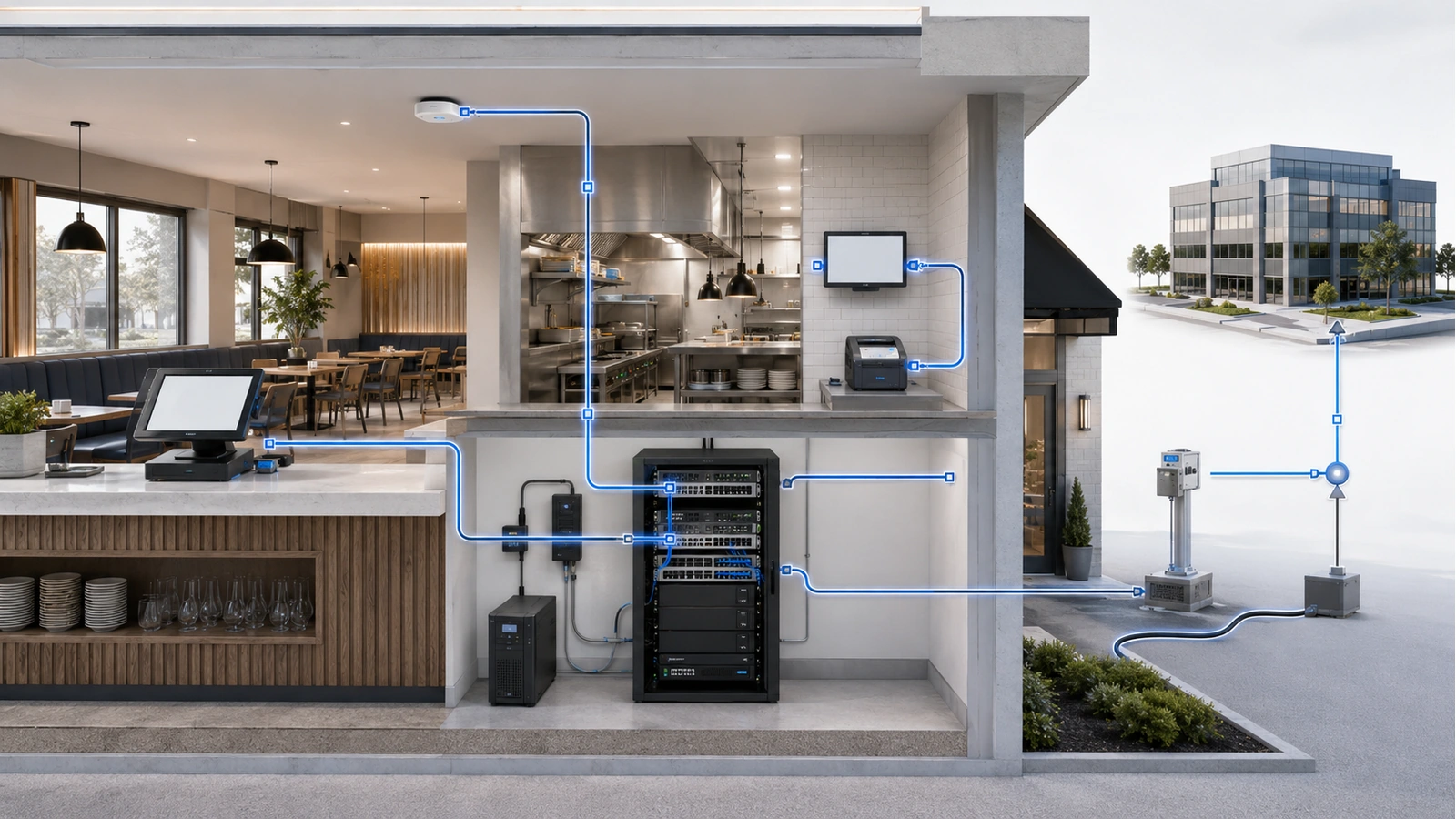
A second internet connection can reduce the effect of a primary-provider outage, but it does not make the operation fully redundant.
Important dependencies may include:
- Carrier entrance and external pathway
- Internet modem or service terminal
- Firewall, gateway, switches, and access points
- Electrical circuits and backup power
- Local cabling and equipment rooms
- DNS, authentication, and cloud platforms
- POS, payment, ordering, or reservation providers
- Staff procedures during degraded operation
Automatic failover may interrupt existing sessions while the network detects the outage and changes paths. Some applications may need to reconnect, and services tied to a specific public address or provider path may behave differently.
A cellular backup must be evaluated at the installed location under realistic conditions. Signal quality, antenna placement, building construction, tower congestion, data limits, carrier outages, and gateway compatibility can affect its usefulness.
Two wired providers can still share external conduits, utility infrastructure, or upstream facilities. The property should understand what diversity it is purchasing rather than assuming that two invoices equal two independent paths.
Most importantly, failover must be tested. The procedure should confirm which services continue, which are intentionally limited, how staff recognize degraded operation, and how the network returns to the primary connection. The dedicated hospitality failover guide covers this process in detail.
08 Coordinate Vendors Through Defined Boundaries
A hospitality property may involve separate vendors for internet, POS, payments, kitchen systems, phones, surveillance, access control, audio, televisions, reservations, and managed IT. Each vendor understands its platform, but no individual vendor automatically owns the complete environment.
The property should define:
- Who owns each device, cable, license, and service account
- Where each vendor’s responsibility begins and ends
- Who may approve network or equipment changes
- Which systems and locations a vendor may access
- How remote access is authenticated and disabled
- Who leads troubleshooting when several systems are affected
- What documentation must be delivered after work
- How equipment and access are transferred when vendors change
Permanent shared credentials, unapproved remote-access appliances, undocumented switches, and overlapping wireless routers create long-term risk. A vendor request should be evaluated against the property’s architecture rather than implemented in isolation.
Centralized oversight does not mean one company must supply every system. It means one authorized owner or technical coordinator maintains the complete map and prevents one installation from unintentionally harming another.
This governance layer is developed fully in Managing Multiple Technology Vendors in Hospitality Environments.
09 Document, Test, and Maintain the Environment
A reliable installation must remain understandable after the original installers leave. Documentation should allow a qualified technician to identify the service path without tracing every cable during a Friday-night outage.
Hospitality Infrastructure Assessment Checklist
- Inventory operational, guest-facing, security, entertainment, and facility systems
- Classify each system by owner, priority, dependency, and failure impact
- Document internet, gateway, switching, wireless, and cabling architecture
- Identify network segments and permitted communication between them
- Record equipment locations, rack layouts, ports, cables, and power sources
- Verify environmental conditions and technician access
- Test POS, kitchen, and staff wireless workflows during realistic operations
- Validate guest isolation and administrative security
- Document vendor accounts, remote access, contracts, and escalation contacts
- Test internet failover, backup power, and restoration procedures
- Maintain configuration backups, licensing records, and equipment warranties
- Require documentation and approval for material infrastructure changes
Monitoring should help distinguish internet failure from wireless trouble, switch failure, cabling damage, power loss, cloud-platform problems, and endpoint malfunction. Without that visibility, unrelated symptoms are frequently blamed on “the Wi-Fi” or “the internet.”
Recurring reviews should remove obsolete vendor access, identify unsupported equipment, verify backups, test failover, review capacity, and update diagrams. Temporary fixes should receive an owner and removal date so they do not become permanent undocumented infrastructure.
Restaurant and hospitality technology performs best when the property treats it as one coordinated operational environment with multiple controlled services. Strong cabling, organized equipment, intentional segmentation, properly designed Wi-Fi, realistic resilience, and accountable vendors create the foundation.
The next article focuses on the system that usually carries the greatest immediate operational consequence: POS Network Design: Stability First, Speed Second.