
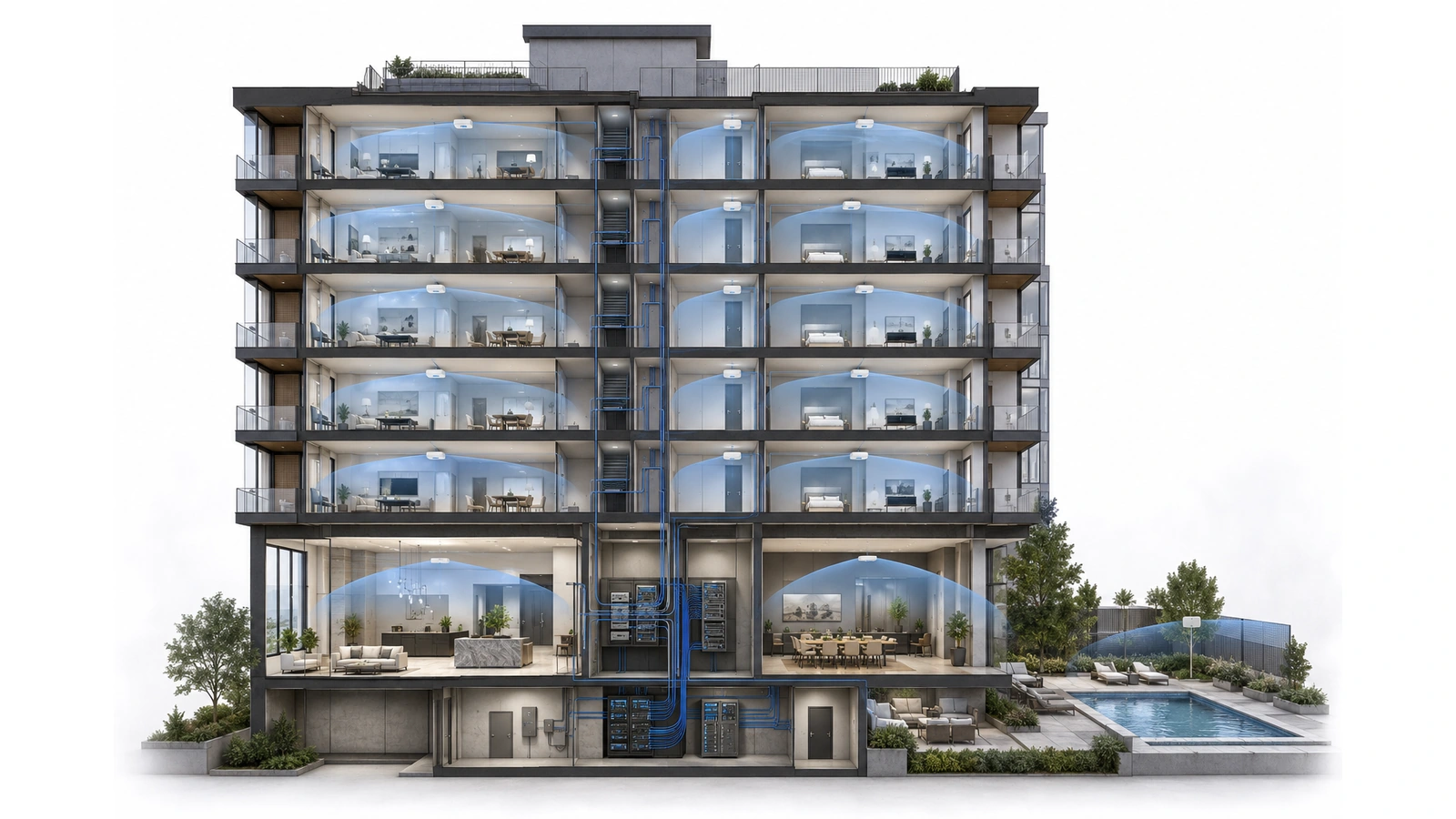
Wi-Fi is the part of a residential network that occupants experience directly. Residents do not see fiber risers, switch uplinks, segmentation policies, or equipment-room conditions. They notice whether a video call remains stable, a smart television connects, or their phone works in the bedroom.
That visibility often causes properties to begin with access-point quantities and locations. A dependable strategy begins earlier: with the service the building intends to provide, the spaces it must cover, the users it will support, and the organization responsible when performance falls short.
Apartment and condominium Wi-Fi must operate among neighboring resident networks, dense construction, vertical signal propagation, changing device populations, and multiple ownership boundaries. More access points or greater transmit power will not compensate for an undefined service model or weak wired infrastructure.
For a detailed explanation of the radio challenges behind these decisions, review Why Consumer Wi-Fi Struggles in High-Rise Buildings.
Key Takeaway
An effective MDU Wi-Fi strategy defines who receives service, where it must work, what performance is expected, who supports it, and which wired infrastructure carries it—before determining access-point models or quantities.
01 Define the Wi-Fi Service Promise
The project team must first determine which spaces and users are included. “Building-wide Wi-Fi” can mean anything from internet access in the lobby to managed connectivity inside every residence.
Potential service areas include:
- Individual apartments or condominium units
- Residential corridors and elevator lobbies
- Main lobbies and reception areas
- Management and maintenance offices
- Clubhouses, lounges, gyms, and meeting rooms
- Pool decks, courtyards, and other outdoor amenities
- Parking structures and loading areas
- Building devices requiring wireless connectivity
Each area can have different requirements. A lobby may need convenient guest access. A meeting room may need reliable video conferencing. A pool deck may need weather-appropriate coverage and seasonal capacity. A residential unit may require private household communication across several rooms.
The property should document whether it promises:
- Basic internet access
- General coverage within selected areas
- Managed connectivity throughout units
- Mobility between common spaces
- Support for specific building applications
- A defined level of availability or performance
A vague promise creates an impossible support boundary. A measurable service objective gives the designer, operator, and residents a common expectation.
02 Select the Ownership and Operating Model
Wi-Fi ownership determines who selects equipment, controls configurations, supports users, receives monitoring alerts, replaces failed hardware, and pays recurring platform costs.
| Operating Model | Typical Responsibility | Primary Planning Requirement |
|---|---|---|
| Resident-managed units | Residents or their internet providers operate in-unit routers and Wi-Fi. | Provide suitable service demarcation and structured cabling while defining the building’s support boundary. |
| Building-managed common areas | The property or operator manages Wi-Fi in amenities, offices, corridors, or outdoor spaces. | Separate guest, staff, operational, and device services while coordinating with nearby resident networks. |
| Managed residential Wi-Fi | The building or contracted operator manages connectivity inside units and shared spaces. | Provide tenant isolation, onboarding, monitoring, support, and consistent lifecycle management. |
| Hybrid service | Responsibility is divided among residents, providers, the property, and service operators. | Document demarcation, coverage, interference, support, and administrative boundaries precisely. |
Resident-managed Wi-Fi can be entirely appropriate when units receive independent internet service and residents are responsible for their internal coverage. The building may still improve outcomes by providing structured cabling and avoiding poorly placed unit demarcations.
Managed residential Wi-Fi can create a coordinated experience, but the building or operator assumes significant obligations. Tenant provisioning, privacy, device support, software maintenance, monitoring, licensing, replacement, and outage response become part of the service.
Hybrid models are common and workable. They require especially clear communication so residents know whether the property supports the internet connection, the gateway, the access point, coverage inside the unit, or only selected common areas.
03 Survey the Building and Its Radio Environment
Floor plans provide a useful starting point, but they do not reveal every condition that affects wireless performance. Wall composition, fire doors, shafts, mirrors, mechanical areas, unit furnishings, neighboring networks, mounting restrictions, and pathway availability all matter.
A design survey should identify:
- Construction materials and significant signal barriers
- Unit layouts and repeated floor-plan variations
- Ceiling heights and approved mounting locations
- Existing telecommunications rooms and cable routes
- Power and network availability
- Current resident, provider, and building-managed networks
- Areas of expected user concentration
- Applications with specific coverage or capacity needs
- Outdoor exposure and environmental conditions
- Areas where installation or future access is restricted
Predictive wireless modeling can estimate access-point placement and signal behavior when accurate floor plans and material assumptions are available. It should be treated as a design model rather than proof of installed performance.
In existing buildings, on-site measurements can reveal neighboring-channel activity and actual attenuation. In new construction, staged validation may be needed as walls, doors, ceilings, and furnishings are completed.
Post-installation testing remains essential because the finished environment may differ from the drawings and assumptions used during design.
04 Design Coverage, Capacity, and Roaming Together
Coverage answers whether a device can maintain an adequate connection in the intended area. Capacity addresses whether the network can support the expected users and applications. Roaming concerns how devices move between access points.
These objectives are related but not interchangeable. A room can show excellent signal while an overloaded access point provides poor service. A high-capacity access point cannot help a device that is behind several dense walls. Overlapping access points may support mobility, but excessive overlap can increase contention.
The design should consider:
- Expected concurrent users rather than only total possible devices
- Application types and their sensitivity to delay or interruption
- Busy periods and high-occupancy events
- Coverage requirements at the edges of the intended service area
- Client-device capabilities
- Channel reuse across adjacent floors and rooms
- Whether continuous roaming is actually required
Client devices ultimately decide when to roam. Network features can assist that process, but they cannot force every phone, laptop, or smart device to behave identically.
The most reliable design creates appropriately sized cells, sufficient signal in required areas, manageable overlap, and enough airtime for expected use.
05 Match Access-Point Placement to Each Environment
Access points should be placed to serve defined areas—not wherever cabling is easiest or equipment is least visible.
Inside residential units
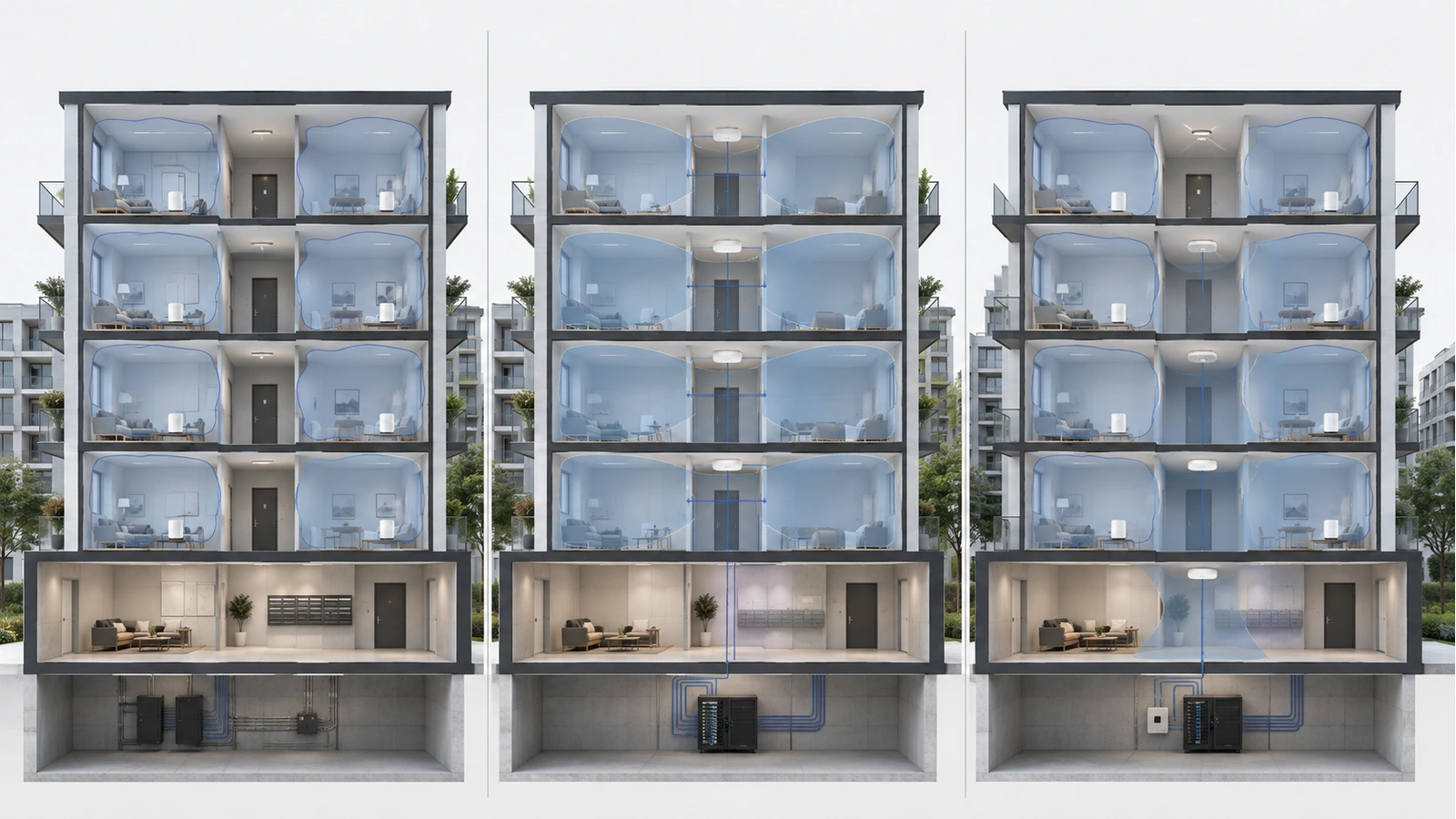
A dedicated in-unit access point or well-positioned resident router can provide predictable service when its location reflects the unit’s construction and geometry. Long units, dense interior walls, and multiple levels may require more than one access point.
Installing a gateway or router inside a metal structured-wiring enclosure may protect and organize the equipment while severely limiting its usefulness as a wireless access point. Where possible, structured cabling should allow wireless equipment to be positioned outside the enclosure.
Corridors and elevator lobbies
Hallway access points can serve corridors, elevator waiting areas, and nearby operational devices effectively. They may also reach some portions of adjacent units.
They should not be assumed to provide complete unit coverage without validation. Fire-rated walls, metal doors, unit depth, and room arrangement can prevent reliable service beyond the corridor-facing area.
Amenities and offices
Clubhouses, fitness rooms, lounges, offices, and meeting spaces should be designed according to occupancy, applications, furniture layout, and operational separation. A large open room may need capacity-focused placement even when one access point could technically produce signal throughout it.
Outdoor and parking areas
Outdoor access points require appropriate environmental ratings, mounting, cabling protection, grounding or surge considerations, and coverage boundaries. Parking structures create complex reflections and should not be treated like open outdoor spaces.
Placement Must Follow the Intended Service Area
A hallway access point is not inherently wrong, and a dedicated in-unit access point is not automatically necessary. The correct location depends on construction, coverage objectives, capacity, cabling, ownership, and verified performance.
06 Use Wired Infrastructure as the Foundation
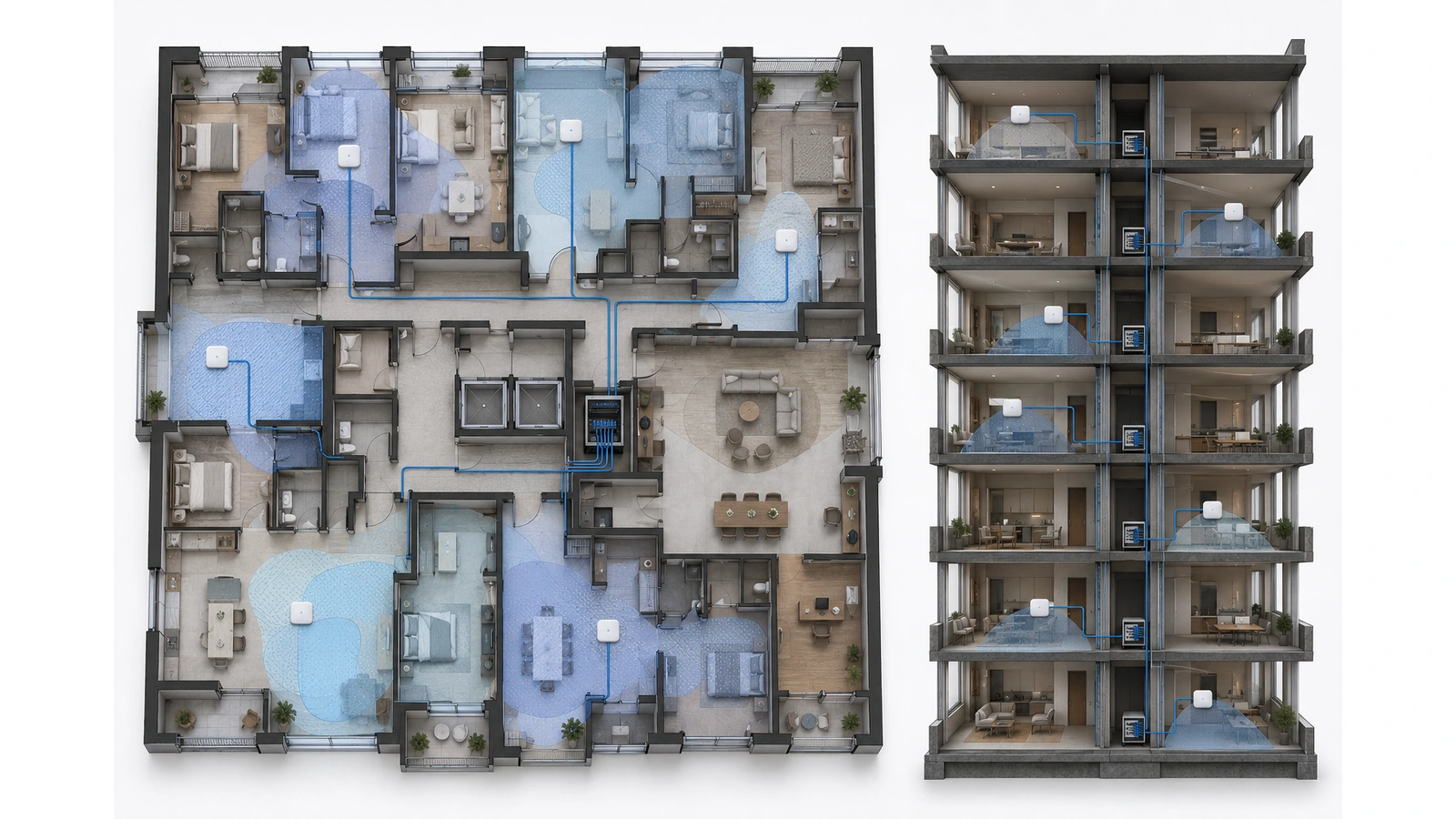
Access points need reliable connectivity to the network behind them. Wired Ethernet or fiber-fed distribution generally provides the most predictable backhaul for a managed deployment.
The supporting infrastructure should address:
- Appropriate cable type and distance
- Switch capacity and uplink design
- Power over Ethernet requirements
- Power budgets under actual load
- MDF and IDF power, cooling, and security
- Backbone capacity during busy periods
- Monitoring and backup-power expectations
- Accessible pathways for additions or replacement
Wireless mesh can be useful where new cabling is impractical, particularly within an individual unit or limited retrofit area. Its backhaul must still operate through the same walls and radio environment affecting client devices.
A mesh node should be placed where it has a reliable upstream connection—not at the deepest point of an existing dead zone. For managed building-wide service, extensive dependence on wireless backhaul can make capacity and troubleshooting less predictable.
Wi-Fi should also not be used automatically for stationary equipment when dependable wired connectivity is practical. Cameras, workstations, televisions, access-control components, and other fixed devices can consume wireless airtime unnecessarily.
07 Coordinate Channels, Power, and Frequency Bands
High-density wireless design aims to reuse spectrum efficiently. It does not attempt to make every access point transmit at maximum power.
Key controls include:
- Appropriate channel widths for the surrounding density
- Channel reuse across rooms, units, and floors
- Transmit power aligned with the intended coverage cell
- Balanced use of 2.4, 5, and 6 GHz capabilities
- Band and client compatibility requirements
- Periodic review as the radio environment changes
The 2.4 GHz band provides broad compatibility and useful propagation but limited channel reuse. It should be planned carefully and may not need to operate from every access point in a dense coordinated deployment.
Five gigahertz commonly carries much of the performance-oriented traffic, but overly wide channels can consume excessive spectrum. Six gigahertz adds valuable capacity for compatible devices, although its shorter practical reach through dense construction makes placement important.
Automatic radio-management systems can respond to changing conditions, but they still require appropriate design parameters and review. Automation should not compensate for excessive access-point density, unsuitable mounting, or missing survey data.
08 Build Security and Resident Operations into Wi-Fi
A managed residential network must give each household a private experience even when residents share access points, switches, fiber, and internet capacity.
The service may use subscriber authentication, unit-specific policy, private client isolation, dynamic network assignments, managed gateways, or other scalable controls. The objective is to prevent one household from discovering or reaching another while allowing authorized devices within the same household to work together where promised.
Separate policies may also be required for:
- Guest and public internet access
- Property-management staff
- Building-owned wireless devices
- Security and operational systems
- Network administration
- Vendors and temporary contractors
For the complete security framework, see Network Security and Segmentation in High-Density Residential Buildings.
Resident operations are equally important. A managed service needs documented processes for:
- Move-in and initial onboarding
- Credential or identity recovery
- Adding personal and smart-home devices
- Move-out and removal of old access
- Privacy and acceptable-use communication
- Escalation from resident support to network operations
- Planned maintenance and outage notification
If the property permits residents to add personal routers or mesh systems behind managed service, the policy should clarify supported configurations and the boundary of troubleshooting responsibility.
09 Validate, Document, and Operate the System
A Wi-Fi installation should be accepted based on verified results rather than the number of installed access points or the controller’s visual dashboard.
In-Building Wi-Fi Deployment Checklist
- Define covered spaces, users, applications, and support expectations
- Document the ownership and service-demarcation model
- Review floor plans, construction materials, pathways, and mounting restrictions
- Complete predictive design and on-site validation appropriate to the project
- Verify access-point cable, power, switch, and uplink capacity
- Document channel, power, frequency-band, and radio-management strategy
- Test coverage and performance in representative unit and common-area locations
- Validate service during realistic occupancy or simulated load conditions
- Test resident, guest, staff, building-device, and management separation
- Verify onboarding, roaming, failure, recovery, and escalation behavior
- Record access-point locations, cable assignments, configurations, and warranties
- Establish recurring reviews for performance, security, capacity, and software lifecycle
Post-installation validation should examine representative devices and applications, not only specialized survey equipment. Testing should include difficult rooms, coverage edges, busy common areas, and transitions between access points where mobility matters.
Ongoing monitoring should distinguish among access-point failure, weak client connection, authentication trouble, upstream congestion, backbone problems, and application outages. Without that visibility, every complaint becomes an undifferentiated Wi-Fi problem.
The documentation package should include floor plans, installed access-point locations, cable and switch-port assignments, service descriptions, network boundaries, radio settings, monitoring responsibilities, administrative access procedures, and acceptance results.
In-building Wi-Fi succeeds when the service promise, building architecture, radio design, security model, and operating process reinforce one another. The goal is not to eliminate every neighboring signal or guarantee identical performance for every device. It is to create controlled, supportable coverage that matches what the property has chosen to provide.
This Wi-Fi strategy completes the building architecture described throughout the category. For the full system perspective, return to How High-Rise Network Infrastructure Works.